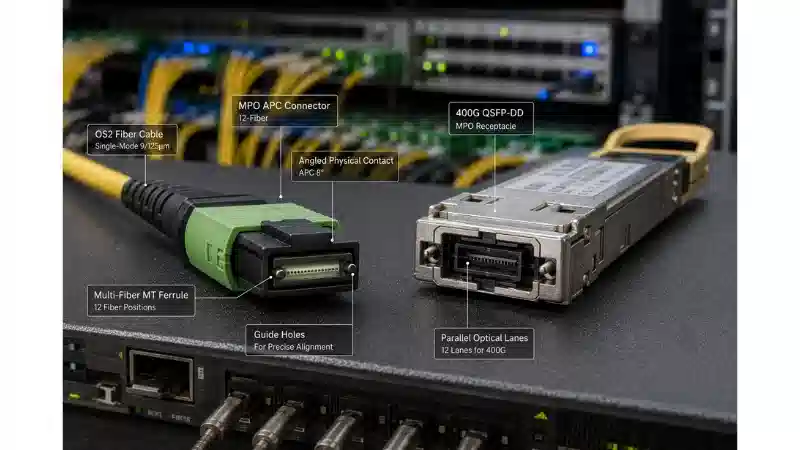
An SFP module is one of the most widely used components for connecting network switches, routers, firewalls, servers, and storage devices to copper or fiber optic cabling. If you have ever seen a small removable transceiver inserted into a switch port, that was most likely an SFP module.
SFP stands for Small Form-factor Pluggable. You may also see it called an SFP transceiver or mini-GBIC. Its purpose is straightforward: it gives network equipment a flexible, modular way to support different cable types, distances, and network environments - without replacing the entire switch or router.
Instead of buying a device with fixed ports, you choose the SFP module that matches your link. That could be a copper RJ45 module for a short Ethernet run, a multimode fiber module for links within a building, or a single-mode fiber module for distances measured in kilometers.

What Is an SFP Module and What Does It Do?
An SFP module is a compact, hot-swappable transceiver that plugs into an SFP port (also called an SFP cage) on a switch, router, firewall, media converter, or network interface card. According to Cisco's transceiver documentation, SFP and SFP+ transceivers are hot-swappable I/O devices designed for use in 100BASE, 1000BASE, and 10GBASE ports, depending on the module and port type.
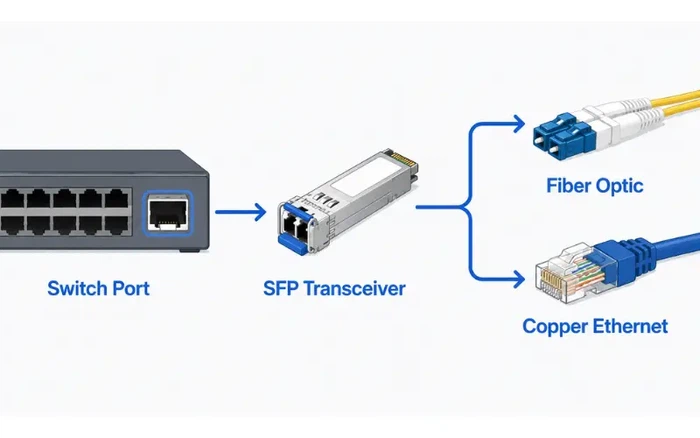
In practical terms, the module performs two jobs. On the host side, it connects to the device through the SFP port, which provides the electrical interface, power, and management communication. On the network side, it connects to the cable - either copper twisted-pair, multimode fiber, or single-mode fiber.
For optical modules, the transceiver converts electrical signals from the host into light for transmission over fiber, and converts incoming light back into electrical signals on the receive side. For copper modules, it provides an RJ45 Ethernet interface and carries the signal over standard network cable.
This design means the same switch model can support very different connections depending on which module you install - a copper RJ45 SFP for short Ethernet runs, a multimode fiber SFP for links inside a building, a single-mode fiber SFP for longer campus or metro connections, or a BiDi SFP for single-fiber transmission.
How Does an SFP Module Work?
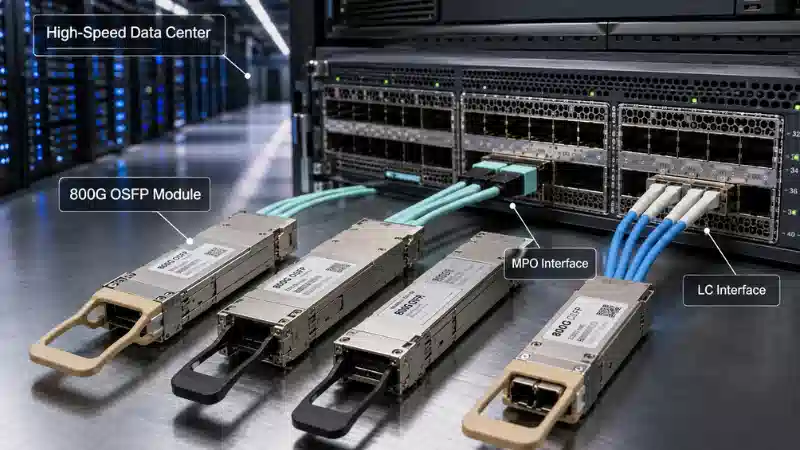
The SFP module sits between the network device and the cabling system. On one side, it slides into an SFP cage on the host device. On the other side, it exposes the cable interface - typically an LC connector for fiber modules or an RJ45 jack for copper modules.
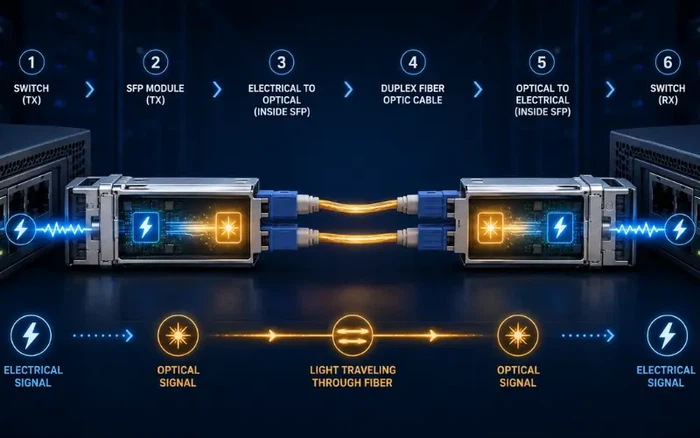
When you insert a module, the host device reads an internal EEPROM that contains identification data: vendor name, part number, supported speed, wavelength, and other parameters. The device checks whether it supports the module type, speed, and vendor coding. This identification process is why compatibility matters so much in practice.
Some devices accept a wide range of third-party modules. Others - particularly certain enterprise switches and adapters - may reject modules that are not on their validated list. Intel, for example, publishes validated module and cable lists for specific Ethernet adapters and notes that other brands of optical modules may not function correctly with certain models. Before ordering, always confirm that the module is supported by the specific device where it will be installed.
Common SFP Module Types
SFP modules are classified by speed, media type, wavelength, and transmission distance. The following are the most common types used in Gigabit Ethernet networks. Note that the distance values listed below are typical and may vary depending on the vendor, fiber grade, connector loss, splice count, and overall optical budget.

1000BASE-T Copper SFP
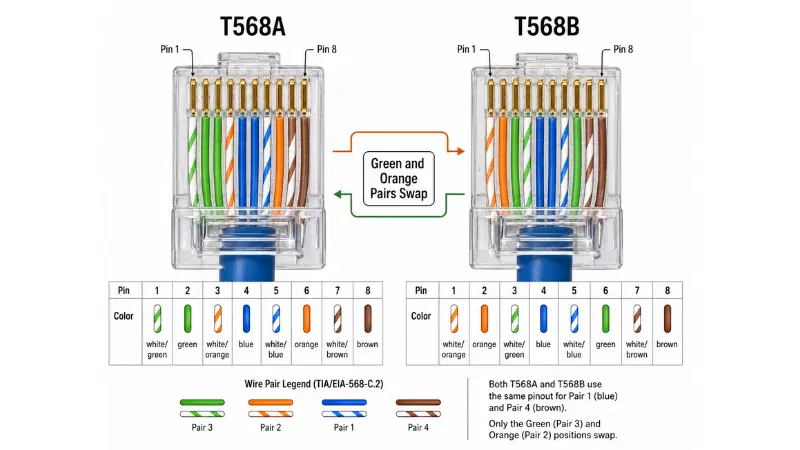
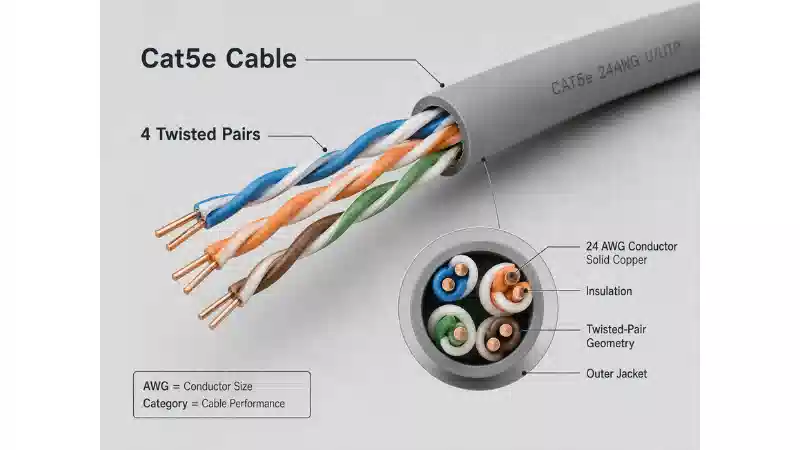
A 1000BASE-T SFP provides an RJ45 copper Ethernet interface, typically supporting Cat5e or better twisted-pair cable for links up to 100 meters. This type is practical when you need to connect an SFP port to copper Ethernet equipment such as a server, firewall, or access switch, or when reusing existing copper cabling infrastructure.
Field tip: Copper SFP modules tend to draw more power and run warmer than fiber modules. Check your switch's power budget per slot before deploying multiple copper SFPs in the same chassis.
1000BASE-SX Multimode Fiber SFP
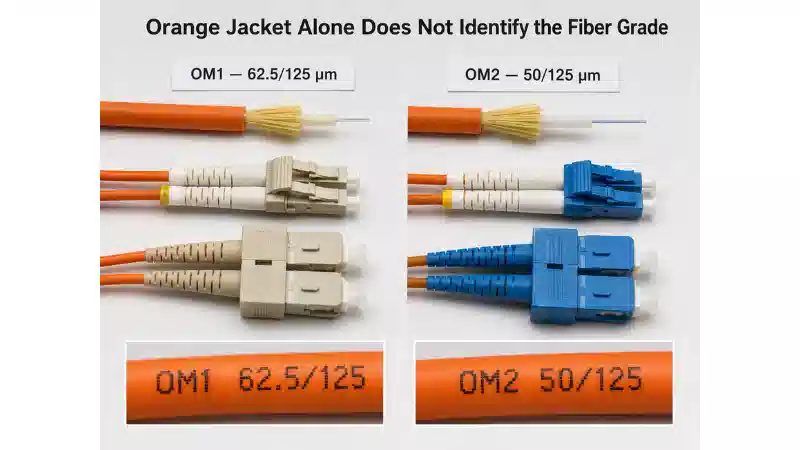
A 1000BASE-SX SFP operates at 850 nm over multimode fiber. Typical reach is up to 550 meters on OM2 (50/125 µm) fiber, though the actual distance depends on the fiber grade. On OM3 or OM4 fiber, you can generally expect reliable operation at or near that distance; on older OM1 (62.5/125 µm) fiber, the supported distance is shorter.
This module is commonly deployed for data center switch-to-switch links, short fiber backbone connections within a building, and environments where OM3 or OM4 multimode fiber is already installed.
1000BASE-LX/LH Single-Mode Fiber SFP
A 1000BASE-LX/LH SFP operates at 1310 nm and is designed for longer links over single-mode fiber, typically supporting distances up to 10 km. It can also operate over multimode fiber for shorter runs (usually up to 550 m), though a mode conditioning patch cord may be required depending on the configuration.
This is the standard choice for building-to-building connections, campus backbone links, and any deployment where single-mode fiber infrastructure is in place.
Long-Reach SFP: 1000BASE-EX and 1000BASE-ZX
For links beyond 10 km, long-reach SFP modules step in. A 1000BASE-EX SFP is designed for single-mode fiber distances up to approximately 40 km, while a 1000BASE-ZX SFP can reach roughly 70–80 km, depending on fiber quality, splices, and connectors along the path.
These modules are typically used in metro Ethernet links, telecom access networks, and remote site connectivity where long-distance single-mode fiber runs are required.
Field tip: Long-reach modules have high transmit power. On very short links (under a few kilometers), the receiver at the far end may be overloaded. In those cases, you will need a fiber optic attenuator to reduce the signal to a safe level. Always review the optical power budget - both the minimum and maximum receiver sensitivity - before installation.
BiDi SFP for Single-Fiber Links
A BiDi (bidirectional) SFP allows full-duplex transmission over a single strand of fiber by using two different wavelengths - one for transmit and one for receive. For example, one end might transmit at 1310 nm and receive at 1550 nm, while the opposite end does the reverse.
BiDi modules must always be purchased and deployed in matched pairs. They are particularly useful for expanding network capacity where only one fiber strand is available per link, or for conserving fiber resources in access networks and building-to-building connections.
Copper SFP vs Fiber SFP: Which Should You Choose?
The choice between copper and fiber depends on four main factors: link distance, existing cabling, electromagnetic environment, and future scalability.
| Factor | Copper SFP | Fiber SFP |
|---|---|---|
| Cable type | Cat5e / Cat6 / Cat6A Ethernet cable | Multimode or single-mode fiber |
| Typical reach | Up to 100 m (1000BASE-T) | Hundreds of meters to tens of kilometers |
| Connector | RJ45 | Usually LC duplex |
| EMI resistance | More susceptible to electromagnetic interference | Highly resistant to EMI |
| Typical use | Short rack-to-rack or room-level links | Backbone, data center, campus, long-distance links |
If the link is under 100 meters and copper cabling is already in place, a copper SFP is often the simplest and most cost-effective option. If you need longer distance, better noise immunity, higher bandwidth scalability, or fiber backbone connectivity, a fiber SFP is the stronger choice.

Single-Mode vs Multimode SFP
Fiber SFP modules must match the installed fiber type. Using a multimode module on single-mode fiber - or the reverse - without checking specifications is one of the most common mistakes in SFP deployment and can cause link failure or unstable performance.
| Factor | Multimode SFP | Single-Mode SFP |
|---|---|---|
| Fiber type | MMF (OM1, OM2, OM3, OM4) | SMF (OS2) |
| Common wavelength | 850 nm | 1310 nm or 1550 nm |
| Common applications | Data centers, in-building links | Campus, metro, long-distance links |
| Typical distance | Short to medium (up to ~550 m) | Medium to very long (up to tens of km) |
For a deeper comparison of reach, cost, and application scenarios, see our guide on single-mode vs multimode fiber.
Before purchasing, confirm the fiber grade (for example, OM3 vs OM4 for multimode, or OS2 for single-mode) and the wavelength. The module, fiber type, wavelength, and distance must all align for the link to function reliably.

SFP vs SFP+ vs SFP28: What Is the Difference?
SFP, SFP+, and SFP28 share a similar physical form factor but are engineered for different data rates.
| Mattress Size | Mattress Size/cm | Box Size/cm | 20GP | 40HQ |
| Single | 92*188 | 37*37*102 | 192PCS | 476PCS |
| King-Single | 107*203 | 37*37*117 | 180PCS | 420PCS |
| Double | 138*188 | 37*37*148 | 144PCS | 336PCS |
| Queen | 153*203 | 37*37*163 | 108PCS | 302PCS |
| King | 183*203 | 37*37*193 | 108PCS | 252PCS |
A common question is whether an SFP module can work in an SFP+ port. In many cases, an SFP+ port will accept a 1G SFP module and operate at 1G, but this depends on the switch model, firmware version, and vendor compatibility list. Always check the device documentation or release notes. The reverse - inserting a 10G SFP+ module into a 1G SFP-only port - generally does not work.
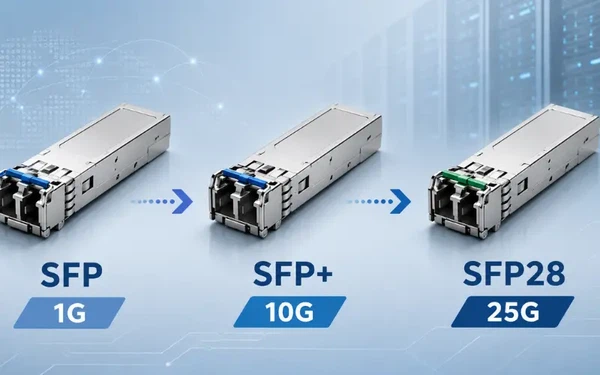
For higher-speed deployments, QSFP modules cover 40G and 100G requirements, while XFP transceivers offer an alternative 10G form factor with a wider feature set. For a detailed comparison, see our article on XFP vs SFP differences.
How to Choose the Right SFP Module?
Selecting the right SFP module is a matter of systematically matching your network requirements to the module's specifications. For most enterprise access links, the safest starting point is to identify the installed cable type and the required distance before looking at specific part numbers.

Step 1: Check Your Port Speed
Start with the port on your switch, router, or network card. Determine whether it is a 1G SFP, 10G SFP+, or 25G SFP28 port. Some ports support dual-rate operation; others are locked to specific vendor-coded modules. For a 1G SFP port, choose a 1G SFP module. For a 10G SFP+ port, choose an SFP+ module unless the device explicitly supports 1G SFP operation in that slot.
Step 2: Confirm Copper or Fiber
Copper is appropriate when the link is within 100 meters, RJ45 cabling is already installed, and you are connecting to copper Ethernet equipment. Fiber is the right choice when the distance exceeds copper's capability, when you need EMI immunity, or when you are connecting across floors, buildings, or data center rows.
Step 3: Match the Transmission Distance
Distance is one of the most critical selection factors, but do not default to the longest-range optic available. A long-reach module on a short link may require optical attenuation and is not always the safest choice. Match the module to the actual link distance:
- 1000BASE-T for copper links up to 100 m
- 1000BASE-SX for short multimode fiber links (typically up to 550 m on OM2/OM3)
- 1000BASE-LX/LH for single-mode fiber links up to 10 km
- 1000BASE-EX or ZX for longer single-mode links, after reviewing the optical power budget
Step 4: Match Fiber Type and Wavelength
Verify whether your installed fiber is single-mode or multimode. Confirm the wavelength (850 nm, 1310 nm, or 1550 nm) and whether the link uses duplex fiber or single-fiber BiDi. For duplex links, both ends should use the same standard - SX-to-SX or LX-to-LX. For BiDi links, both ends must be complementary wavelength pairs.
Step 5: Check the Connector Type
Most fiber SFP modules use LC duplex connectors, but you should still confirm this before purchasing. Copper SFP modules use RJ45 connectors. Also check the existing patch cords and patch panels - the correct module paired with the wrong fiber connector or cable will still fail to complete the link.
Step 6: Verify Device Compatibility
Compatibility is frequently the deciding factor. Before ordering, check the switch or router's support list, the vendor compatibility matrix, the required module coding, and the firmware version. A module can be technically correct for the distance and wavelength but still be rejected by the host device if it is not on the validated list.
Step 7: Evaluate DOM, Temperature, and Supplier Quality
Digital Optical Monitoring (DOM), also called DDM, allows the device to report real-time parameters including optical transmit power, receive power, temperature, laser bias current, and supply voltage. The DOM capability is defined in the SFF-8472 specification from the SFF Committee. DOM is valuable for troubleshooting weak signals, dirty connectors, failing optics, and intermittent link errors.
For more details on DOM/DDM functionality, see our article on DDM, DOM, and RGD functions of SFP modules.
Also consider the operating temperature range. Standard commercial modules (typically 0°C to 70°C) are suitable for climate-controlled indoor environments. Outdoor cabinets, factories, transportation systems, and harsh environments often require industrial temperature modules (typically −40°C to 85°C). Always verify the temperature specification against the installation environment.
SFP Module Selection Checklist
Before placing an order, confirm the following items against the device datasheet and the installation environment:
- Port type and speed (SFP, SFP+, SFP28)
- Media type (copper RJ45 or fiber LC)
- If fiber: single-mode or multimode, and the specific fiber grade (OM3, OM4, OS2)
- Required link distance
- Wavelength (850 nm, 1310 nm, 1550 nm, or BiDi pair)
- Connector type compatibility with existing patch cords and panels
- Device vendor compatibility list and required firmware version
- DOM/DDM support requirement
- Operating temperature range (commercial vs industrial)
- Optical power budget - both minimum and maximum receiver sensitivity
Practical SFP Selection Examples

Example 1: Two Switches in the Same Rack
For a short link within the same rack, either a 1000BASE-T copper SFP (using a standard RJ45 patch cable) or a 1000BASE-SX multimode fiber SFP will work. If the switches are in adjacent rack units and you already have copper patch cables on hand, the copper SFP is the fastest path. If you prefer fiber for a cleaner cable run or to avoid ground loop issues, a short OM3 multimode fiber link with 1000BASE-SX is a good alternative.
Example 2: Two Floors in the Same Building
First, identify the fiber type in the building riser. If it is OM3 or OM4 multimode fiber and the distance is within 550 m, a 1000BASE-SX SFP on each end will work. If the backbone is OS2 single-mode fiber - which is increasingly common in newer buildings - use 1000BASE-LX/LH modules instead.
Example 3: Two Buildings Across a Campus
For building-to-building links, single-mode fiber with 1000BASE-LX/LH SFP modules is usually the safest and most scalable choice. If the link exceeds 10 km, move to 1000BASE-EX or ZX after calculating the optical power budget - accounting for fiber attenuation, connector losses, and splice losses along the route.
Example 4: Reusing Existing Copper Cabling
If you have Cat5e or better copper cabling in place and the run is under 100 m, a 1000BASE-T copper SFP lets you connect an SFP-equipped switch to the existing copper infrastructure. Confirm in the switch documentation that the device supports copper SFP modules - not all SFP ports do.
Troubleshooting: Why Your SFP Link Does Not Come Up
Even with the correct module on paper, links sometimes fail to establish. Here are the most common causes and what to check.

- Module not detected: The switch log or CLI may show "unsupported transceiver" or "unknown module." This usually indicates a compatibility or coding issue. Check the switch's supported module list and firmware version. Some devices have a command to enable support for third-party modules (check the vendor documentation for the specific syntax).
- Link flapping or CRC errors: If the link comes up but drops intermittently or shows a high CRC error rate, the problem is often dirty fiber end-faces or a marginal optical power level. Use DOM to check the Tx and Rx power readings. If the Rx power is near or below the module's minimum receiver sensitivity, clean the LC connectors and the fiber patch panel ports using a proper fiber cleaning tool. Re-check the power readings after cleaning.
- Mismatched modules: Both ends of the link must use compatible modules - the same wavelength and the same standard. Connecting a 1000BASE-SX module (850 nm) to a 1000BASE-LX module (1310 nm) will not work, even if the fiber type and distance are correct.
- Fiber type mismatch: A single-mode module on multimode fiber (or vice versa) can cause link failure, high loss, or unstable performance. Verify the fiber type at both ends before assuming the module is faulty.
- Receiver overload on short links: If you install a long-reach module (such as 1000BASE-ZX) on a very short fiber link, the received power may exceed the module's maximum input. Insert the appropriate fiber optic attenuator to bring the power within spec.
Common Mistakes When Buying SFP Modules
Choosing by distance only
Distance matters, but it is not the only factor. Speed, wavelength, fiber type, connector, and device compatibility all have to match. A module that covers the distance but uses the wrong wavelength will not establish a link.
Ignoring vendor compatibility
Some switches and adapters will reject modules that are not on their validated list, even if the module is technically correct. Always check the compatibility matrix before ordering - especially for Cisco, Juniper, HP/Aruba, and Intel devices.
Using the wrong fiber type
Pairing a single-mode module with multimode fiber (or vice versa) without reviewing the specifications is a frequent cause of failed or degraded links. When in doubt, check the fiber jacket color (orange or aqua typically indicates multimode; yellow typically indicates single-mode) and verify with the cable label or documentation.
Forgetting to clean fiber connectors
Dirty fiber end-faces are a leading cause of weak optical power, elevated bit error rates, and intermittent link errors. Always clean and inspect fiber connectors before concluding that the SFP module is defective. A one-click cleaner or lint-free wipe with IPA is usually sufficient.
Overlooking temperature requirements
A standard commercial-grade module used in an outdoor cabinet or an unventilated industrial enclosure may fail or degrade prematurely. Check whether you need an extended or industrial temperature module for your environment.
Not buying BiDi modules in pairs
BiDi modules must be deployed as complementary wavelength pairs - one transmitting at a shorter wavelength and receiving at a longer wavelength, with the opposite arrangement at the far end. Ordering a single BiDi module without its matching partner will result in a non-functional link.
FAQ About SFP Modules
What does SFP stand for?
SFP stands for Small Form-factor Pluggable. It is a standardized, compact transceiver form factor used for data communication and telecommunication applications. The SFP specification was developed to replace the older, larger GBIC form factor.
What is the difference between SFP and GBIC?
GBIC (Gigabit Interface Converter) and SFP serve the same basic function, but SFP modules are roughly half the size of GBIC modules. This smaller form factor allows higher port density on switches and routers. SFP effectively replaced GBIC as the industry standard and is sometimes called mini-GBIC for this reason.
What is an SFP module used for?
An SFP module connects network equipment to copper or fiber cabling. It allows switches, routers, firewalls, and servers to support different cable types and distances through interchangeable transceivers, rather than requiring fixed-port hardware for each connection type.
Is SFP copper or fiber?
SFP modules are available in both copper and fiber versions. Copper SFP modules use RJ45 connectors for Ethernet cable, while fiber SFP modules use LC connectors and operate over multimode or single-mode fiber.
Can I use an SFP module in an SFP+ port?
In many cases, yes - an SFP+ port can accept a 1G SFP module, but the port will operate at 1G rather than 10G. Support depends on the specific device, firmware, and vendor compatibility list. Check the switch documentation before relying on this.
Can I use an SFP+ module in an SFP port?
Generally no. A 1G SFP-only port usually cannot support a 10G SFP+ module.
Are all SFP modules compatible with all switches?
No. While the SFP form factor is standardized per the Multi-Source Agreement (MSA), individual switch vendors may restrict their ports to accept only validated or vendor-coded modules. Always check the device's compatibility list before purchasing.
Why is my SFP module not detected?
The most common reasons are vendor compatibility restrictions (the switch does not recognize the module's coding), a firmware version that does not support the module type, a physical seating issue (the module is not fully inserted), or a damaged module. Check the switch logs or CLI for specific error messages, and consult the vendor's supported transceiver list.
What is DOM in an SFP module?
DOM stands for Digital Optical Monitoring (also called DDM - Digital Diagnostics Monitoring). It allows the host device to monitor real-time parameters such as optical transmit and receive power, temperature, voltage, and laser bias current. DOM is defined by the SFF-8472 specification and is valuable for proactive troubleshooting and preventive maintenance.
What is the difference between 1000BASE-SX and 1000BASE-LX?
1000BASE-SX operates at 850 nm over multimode fiber for shorter distances (typically up to 550 m). 1000BASE-LX operates at 1310 nm and is designed primarily for single-mode fiber at distances up to 10 km, though it can also work over multimode fiber for shorter runs. They use different wavelengths and are not interchangeable - both ends of a link must use the same standard.
How far can an SFP module transmit?
It depends on the module type. Copper 1000BASE-T supports up to 100 m. 1000BASE-SX supports multimode fiber links typically up to 550 m. 1000BASE-LX/LH supports single-mode fiber links up to 10 km. Long-reach modules like 1000BASE-EX and 1000BASE-ZX can extend to 40 km and beyond, depending on fiber quality and the link's optical power budget.
Do SFP modules need to be configured?
In most cases, SFP modules are plug-and-play - the host device reads the module's EEPROM and configures the port automatically. However, some switches require you to set the port speed manually or enable support for third-party transceivers. Check the device configuration guide for any required steps.
Conclusion
An SFP module is a small but essential component in modern networking infrastructure. It gives switches, routers, and other devices the flexibility to support copper, multimode fiber, single-mode fiber, short links, long links, and a range of deployment environments - all through a single, standardized port design.
To choose the right module, work through the checklist: port speed, cable type, distance, wavelength, fiber grade, connector, device compatibility, DOM support, and temperature range. Verify both the network requirement and the host device's supported module list before ordering. A well-matched SFP module simplifies deployment and delivers reliable performance; a poorly matched one leads to link failures, wasted troubleshooting time, and unnecessary cost.
If you need help selecting the right fiber optic transceiver or matching fiber patch cables for your deployment, consult with your supplier's technical team and provide the device model, installed fiber type, and required link distance - these three details will narrow the options quickly.