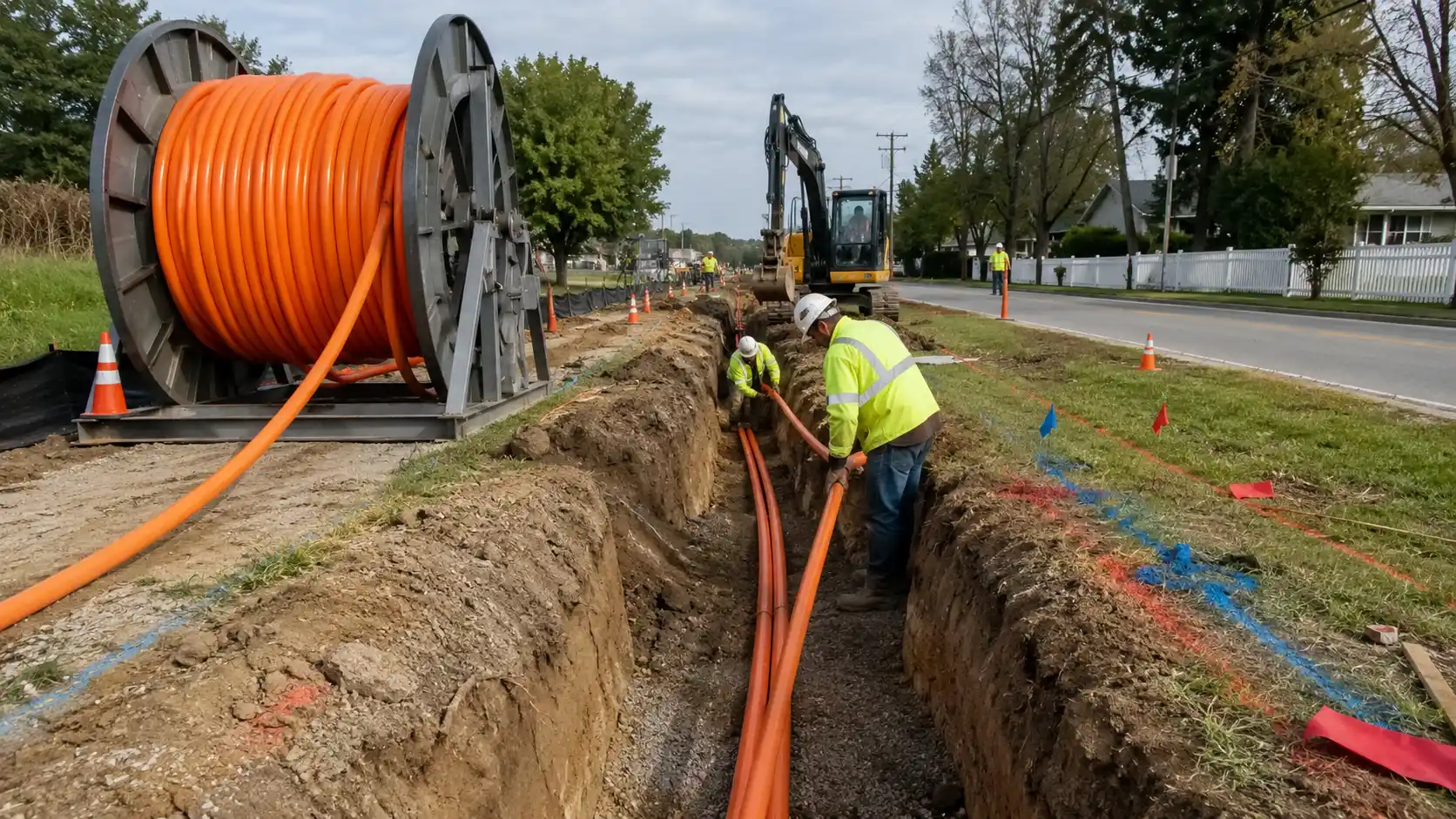
If you are evaluating patch panels and cassettes, you are probably trying to solve one of three problems: messy cable management, limited rack space, or the need to support future changes without ripping out an entire panel. A modular cassette patch panel gives you a centralized, structured location for organizing connections, while cassettes make that setup modular - allowing you to add fiber, copper, or mixed-media connectivity section by section.
For most network teams, the real question is not whether patch panels are useful. It is how to choose the right combination for your environment. That decision depends on media type, connector compatibility, port density, installation method, and how much flexibility you need for future moves, adds, and changes. This guide walks through each of those factors and helps you match a panel and cassette system to your actual deployment.
What Is a Patch Panel Cassette?
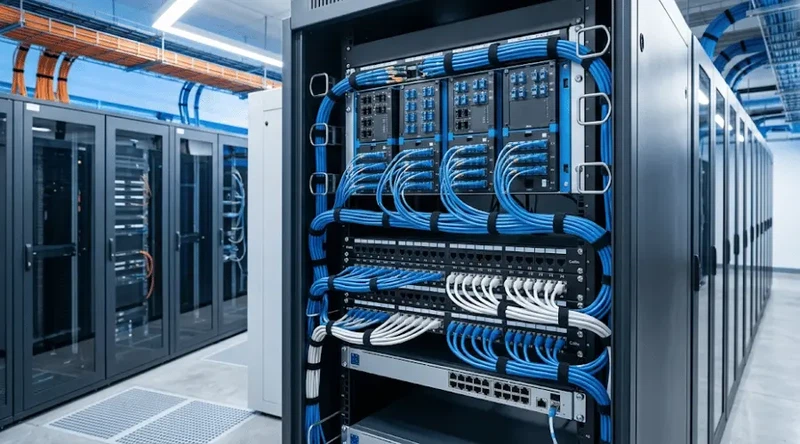
A patch panel is a passive connection point used to organize and distribute network cabling. It does not switch or route traffic. Instead, it creates a structured termination point where cables can be patched, labeled, and serviced efficiently. Patch panels are standard infrastructure in data centers, telecom rooms, and enterprise networks, and they are defined as part of the structured cabling subsystem in the ANSI/TIA-568 family of standards.
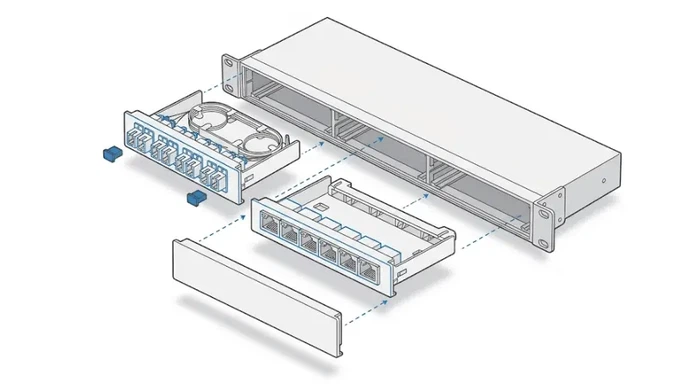
A cassette is the modular unit that fits into a compatible panel or enclosure. Rather than committing an entire panel to a fixed connector layout, a cassette-based design lets you install individual modules built for specific media types or connector families. That means you can configure a single enclosure for fiber optic patch cables, copper Ethernet, or a mix of both - and reconfigure sections later without replacing the whole panel.
Patch Panel vs. Switch: A Common Confusion
A patch panel organizes and presents connections. A network switch actively moves traffic between devices. One is passive cabling infrastructure; the other is active networking equipment. If your goal is better cable organization, easier cross-connects, and cleaner maintenance access, you need a patch panel - not a switch replacement. If you need to understand how these connect in practice, the process typically involves running structured copper or fiber cabling from endpoints to the panel, then using short patch cords from the panel to the switch.

Fiber vs. Copper vs. Mixed-Media Cassettes: Which Should You Choose?
The first decision in any cassette selection process is media type. Your cabling environment determines whether you need fiber cassettes, copper cassettes, or a mixed-media approach.
Fiber Optic Cassettes
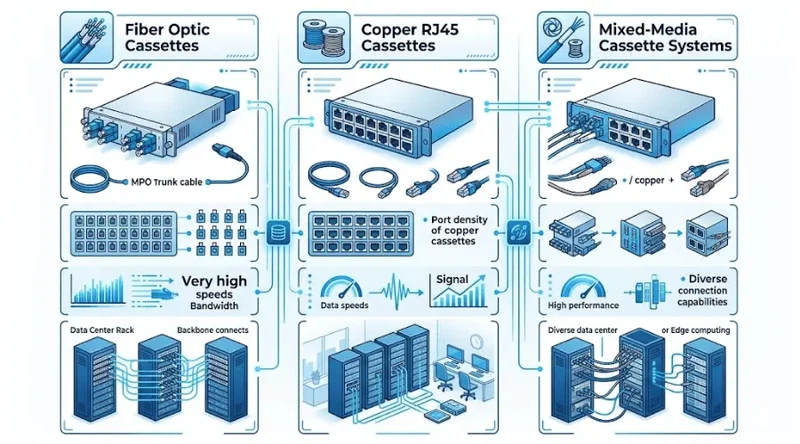
Fiber cassettes are designed for high-speed, high-bandwidth connections and are the dominant choice in data center backbone links, telecom networks, and enterprise uplinks. Depending on the design, they support connector styles including LC, SC, MPO, and MTP. MPO connectors follow the IEC 61754-7 and TIA-604-5 (FOCIS 5) standards, while MTP is a performance-enhanced version trademarked by US Conec with tighter mechanical tolerances and lower insertion loss.
If your environment handles 10G, 40G, 100G, or 400G traffic, fiber cassettes are typically the starting point. They deliver high port density in a compact footprint and simplify the transition from trunk cables to individual duplex connections at the panel face.
Copper Cassettes
Copper cassettes are built for Ethernet-based environments, typically with RJ45 interfaces. They are common in office LANs, campus networks, and deployments where most endpoints still connect via Cat5e, Cat6, or Cat6A cabling. A copper cassette offers a modular alternative to a fully fixed copper panel, which makes future reconfigurations easier - especially in environments where port assignments shift frequently.
When selecting copper cassettes, confirm that the category rating of the cassette matches or exceeds the cable you are using. Installing a Cat5e cassette on a Cat6A run limits performance to the weakest component in the channel, per TIA-568 channel performance rules.
Mixed-Media Cassettes
Mixed-media setups allow both fiber and copper connectivity within the same panel enclosure. This is especially useful during phased network upgrades - for example, when you need to keep copper endpoints active while rolling out singlemode fiber uplinks to a new backbone segment. Rather than maintaining separate panels for each media type, a mixed-media cassette approach consolidates everything into one rack footprint.
In practice, mixed-media is one of the strongest arguments for choosing a modular cassette system in the first place. It reduces the number of separate panels you need and supports a more gradual migration path from legacy copper to fiber.
Quick Comparison
| Type | Best for | Main advantage | Watch out for |
|---|---|---|---|
| Fiber cassettes | Backbone, uplinks, high-speed links | High density and cleaner fiber management | Connector compatibility and bend radius management |
| Copper cassettes | Office LANs, RJ45-heavy deployments | Familiar interfaces, easy copper organization | Category rating must match cable performance class |
| Mixed-media setups | Hybrid networks and phased transitions | Consolidates fiber and copper in one enclosure | Planning complexity and cross-system compatibility checks |
Why Use Modular Patch Panels and Cassettes?
The biggest benefit of a modular cassette system is not raw speed - a patch panel is passive and does not amplify or process signals. The real value is in infrastructure control: how easily you can manage, maintain, and adapt your cabling over time.
Cleaner Cable Management

Patch panels turn scattered cable terminations into a structured, labeled layout. In a crowded rack where multiple teams make changes over months or years, that structure prevents the gradual accumulation of unlabeled, tangled cabling that makes troubleshooting painful. A well-organized panel with clearly identified connectors means a technician can trace, verify, and re-patch a port in minutes instead of hours.
Easier Moves, Adds, and Changes
Network ports do not stay static. Teams add devices, relocate endpoints, upgrade uplinks, and repurpose rack space. A modular cassette design lets you reconfigure individual sections of the panel without redoing the entire front face. In one common scenario, a 24-port copper cassette can be swapped for a 24-port fiber cassette in the same slot when an office zone migrates from Ethernet to fiber - no new enclosure needed.
How Patch Panels Save Rack Space
A modular panel consolidates different connection types into a single enclosure strategy. Instead of dedicating one 1U panel to fiber uplinks and another to copper endpoints, you can house both in the same high-density fiber enclosure. In space-constrained cabinets, this can free up one or two rack units - which matters when every U of space has a direct cost attached to it.
Better Scalability and Serviceability
As port density grows, the cost of poor organization rises with it. A well-chosen cassette system makes future expansion simpler, especially if you leave open slots for growth and use a standard footprint that your team can source again later. The practical rule is to plan for at least 20–30% spare capacity rather than fully packing every slot on day one.
How to Choose the Right Patch Panel and Cassette Setup: A 5-Step Framework?
The following five steps form a repeatable selection framework. They are ordered so that each decision narrows the options for the next.

Step 1 - Confirm Your Media Type and Connector Style
Start with the question that everything else depends on: are you supporting fiber, copper, or both? Then narrow by connector family. For fiber, that means identifying whether you need LC duplex, SC, or MPO/MTP multi-fiber connectors - and whether the application is singlemode (OS2) or multimode (OM3/OM4/OM5). For copper, confirm the cable category and whether you need shielded (STP/FTP) or unshielded (UTP) interfaces. If this step is vague, every downstream decision will drift.
Step 2 - Evaluate Port Density Against Available Rack Space
Do not choose a system based only on the maximum port count printed on a datasheet. Think about how many connections you need now, how many you will need in 12–24 months, and how much physical rack space you have. A 1U modular patch panel can hold anywhere from 24 to 144 fiber ports depending on the cassette configuration - but higher density means tighter cable routing and more discipline around bend radius management.
Step 3 - Decide Between Pre-Terminated and Field-Terminated Designs
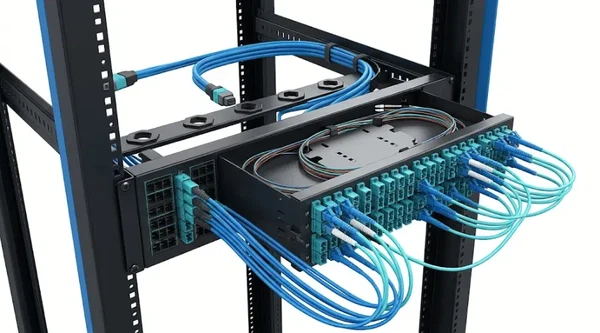
Pre-terminated cassettes arrive factory-tested with connectors already installed, which speeds deployment and reduces on-site labor. Field-terminated approaches offer more customization but require splicing or connectorization on site. Pre-terminated designs are usually a better fit when deployment speed and consistency matter more than field flexibility - especially in standardized data center environments where every rack follows the same template. If you are evaluating pre-terminated fiber options, MTP harness cables are a common component in this approach.
Step 4 - Review Accessibility, Labeling, and Maintenance Access
A panel that looks efficient in a product photo can be frustrating in a live rack if technicians cannot reach, trace, or relabel ports easily. Evaluate front and rear cable access, jumper routing clearance, and label visibility under actual rack lighting conditions. In a 42U cabinet with equipment above and below the panel, rear access for trunk cables is often the factor that determines whether the installation stays maintainable after six months of changes. Bend radius matters here too - the ANSI/TIA-568.3 standard specifies minimum bend radius requirements for fiber cables, and violating those limits inside a crowded panel can degrade link performance.
Step 5 - Plan for Growth and Future Migration
Do not design only for today's port count. Leave open cassette slots for expansion, connector changes, or a staged migration from copper to fiber. A modular cassette system is most valuable when you actively use it as a growth strategy - not just as a different front panel layout. If you anticipate a shift to higher-speed fiber (for instance, upgrading from 10G to 40G/100G using MPO trunk cabling), choose an enclosure and cassette footprint that supports both your current and target configurations.
Use Cases: Matching Cassette Systems to Real Environments
Data Center Fiber Backbone

In a data center, the priority is density, speed, and the ability to service links at scale. Fiber cassettes with MPO-to-LC modules are the most common configuration here. An MPO trunk cable enters the rear of the cassette, and the front face presents individual LC duplex ports for patching to switches and servers. This design simplifies trunk management and makes port-level changes fast. The selection of singlemode vs. multimode cassettes depends on your link distances and transceiver requirements - OM4 multimode supports 100G SR4 up to 100 meters, while OS2 singlemode covers longer backbone runs.
Office LAN with Copper Endpoints
In an office network where endpoints are predominantly RJ45, copper cassettes provide a cleaner alternative to fixed punch-down panels. The advantage is not maximum density - it is maintainability. When a floor rearrangement changes port assignments, swapping or reconfiguring a modular copper cassette is faster and less disruptive than re-terminating a fixed panel. For offices running a mix of Cat5e and Cat6 patch cables, modular panels also let you keep different cable categories organized by cassette slot.
Hybrid Environment Upgrading from Copper to Fiber

A phased network upgrade is where mixed-media cassette design proves its value. If you need to keep copper access-layer ports active while introducing OM3 multimode fiber for new uplinks, a mixed-media approach lets both coexist in the same enclosure. As the migration progresses, copper cassettes are swapped out for fiber cassettes one zone at a time - with no disruption to the rest of the panel. This is often the lowest-risk path for organizations that cannot justify a full cutover in a single maintenance window.
Common Mistakes to Avoid
Choosing a system based only on port count.
High density sounds attractive, but if the panel becomes harder to route, label, or service, operational costs rise quickly. A slightly lower-density layout with better front and rear access is often the better long-term choice - especially in environments where technicians need to make changes under time pressure.
Assuming cassettes and panel footprints are universally interchangeable.
Compatibility varies by system, connector style, and manufacturer. An LGX-style cassette from one vendor may not seat correctly in another vendor's enclosure. Always confirm that the cassette, enclosure, and cabling interface are designed to work together before standardizing. This is especially important with fiber optic adapters, where small mechanical differences can affect insertion loss.
Ignoring the rear of the rack.
Front-facing ports may look clean, but cable routing, bend radius, and trunk management behind the panel are often what determine whether the system stays maintainable after deployment. Industry cabling standards including ANSI/TIA-568 and ISO/IEC 11801 both emphasize pathway management and minimum bend radius as factors in channel performance and long-term reliability.
Expecting a patch panel to replace switching hardware or increase bandwidth.
A patch panel improves structure, manageability, and upgrade flexibility. The actual performance of the link depends on the quality of every component in the channel - cable, connectors, patch cords, and the transceivers at each end.
Fully packing every slot on day one.
If your environment is likely to change - and most are - leave at least a few open cassette positions for future adds, connector format changes, or emergency spares. The cost of empty slots now is far lower than the cost of replacing an enclosure later because you ran out of room.
Modular Patch Panel vs. Fixed Patch Panel: When Is Modular Overkill?
Not every installation needs a modular cassette system. In a small, stable environment - say, a single-rack IDF closet with 24 copper ports that will not change for years - a fixed patch panel may be simpler and more cost-effective. Modular systems add value when you expect frequent changes, mixed media, phased upgrades, or growth. If none of those apply, the extra cost and complexity of modularity may not pay for itself. The practical threshold is usually around the point where you are managing more than one media type or planning for a significant port expansion within the next two to three years.
FAQ
Do patch panels improve network speed?
Not directly. Patch panels are passive - they do not amplify or process signals. Their value is in organization, easier maintenance, and better support for structured cabling. Indirectly, a cleaner and better-managed setup reduces connection errors and makes it easier to maintain proper link integrity, which can prevent performance problems caused by poor patching or damaged connectors.
Can one patch panel support both fiber and copper?
Yes, if the system uses modular cassettes compatible with both media types. This is one of the primary advantages of cassette-based panel designs. You install fiber cassettes in some slots and copper cassettes in others, all within the same enclosure.
What is the difference between a cassette and an adapter plate?
A cassette is a self-contained modular unit that typically includes internal fiber routing and presents a specific connector format on the front face. An adapter plate is a simpler component that holds adapters in a flat plate format without internal cable management. Cassettes offer more protection and organization for the fibers inside, while adapter plates are lighter and lower cost. The right choice depends on your density requirements and how much internal fiber management you need.
What is the difference between a patch panel and a keystone patch panel?
A keystone patch panel uses snap-in keystone jacks that can be individually replaced or reconfigured. A standard fixed patch panel has permanently installed ports. Keystone panels offer more flexibility for mixed-media or mixed-category deployments, but the per-port cost is typically higher and the assembly takes more labor. In fiber environments, cassette-based modular panels serve a similar flexibility role.
Are modular patch panels better than fixed patch panels?
It depends on your environment. Modular panels are better when you need flexibility, mixed media, or expect frequent changes. Fixed panels are simpler and cheaper for stable, single-media deployments. The deciding factor is usually whether the cabling layout will change within the panel's service life.
When should I choose MPO/MTP cassettes?
MPO/MTP cassettes are most valuable in high-density fiber environments supporting 40G, 100G, or 400G connections. They allow a single multi-fiber MPO trunk cable to fan out into individual LC or SC duplex ports at the panel face. This dramatically simplifies trunk-to-port transitions and reduces the number of cables in the pathway. If your network uses parallel optics or high-density spine-leaf architectures, MPO/MTP cassettes are typically the right choice.
Can I mix shielded and unshielded copper cassettes in one setup?
Technically, you can install both in the same enclosure if the cassette footprint is compatible. However, mixing shielded (STP/FTP) and unshielded (UTP) components in the same channel is not recommended, because mismatched shielding can introduce grounding issues and actually degrade performance. Keep each channel consistent from end to end.
What should I check before buying a fiber cassette patch panel?
Confirm the following: connector type (LC, SC, MPO/MTP), fiber mode (singlemode OS2 or multimode OM3/OM4/OM5), cassette-to-enclosure compatibility, port density per cassette, pre-terminated vs. field-terminated, and whether the rear entry accommodates your trunk cable diameter and bend radius. Also verify that the connector polish type (UPC or APC) matches your system requirements.
Do cassette-based systems reduce installation time?
Pre-terminated cassette systems can significantly reduce installation time compared to field termination. Because the cassettes arrive factory-tested with connectors already attached, on-site labor is limited to mounting the enclosure, sliding in cassettes, and connecting trunk cables. Studies from connector manufacturers have shown that pre-terminated multi-fiber systems can reduce deployment time by 50–70% compared to individual splice-based termination.
How do I plan patch panel capacity for future growth?
Start with your current active port count, then add realistic room for growth over the next 2–3 years. A common guideline is to provision 20–30% spare capacity. Consider not just the number of ports but also whether your media type or connector format may change - a modular cassette system lets you accommodate that shift without replacing the enclosure. Factor in planned expansions, technology refreshes, and any anticipated migration from copper to singlemode fiber.
Conclusion
Patch panels and cassettes are not just about making a rack look tidy. They are about building a cabling infrastructure that is easier to manage, easier to adapt, and less costly to upgrade. The right system depends on your media type, connector requirements, density needs, and how much your network is likely to change.
Before comparing products, audit your current environment. List your connector types, count active and planned ports, note rack space constraints, and decide whether your next phase is fiber, copper, or hybrid. That inventory makes the selection process straightforward - and it helps you avoid buying a system you will outgrow in two years.
If you are building or upgrading a structured cabling layout, explore FOCC's full product catalog for modular patch panels, fiber cassettes, MPO/MTP assemblies, and compatible connectivity components.