You know what's funny? I've been working with fiber optics for years, and I still remember the first time someone handed me an MPO adapter and just said "figure it out." No manual, no diagram, just this little rectangular piece of plastic that somehow manages to align 12 or 24 tiny glass fibers with basically zero room for error.
The thing is, MPO adapters look deceptively simple. They're just these small connector housings, right? But there's actually a lot happening inside that most people don't think about.

The Basic Idea (Which Isn't That Basic)
So here's the deal with MPO adapters - they're essentially precision alignment sleeves. But calling them that feels like calling a Swiss watch "a device that tells time." The core job is to take two MPO connectors and line them up so perfectly that light can pass through with minimal loss. We're talking about tolerances that would make a machinist weep.
Inside the adapter, there's this ceramic or phosphor bronze sleeve (sometimes both, depending on the design and honestly, the manufacturer's philosophy on life). The sleeve has guide pin holes that accept the guide pins from the MPO connectors. And this is where it gets interesting - only ONE of the two connectors you're mating should have pins. If both have pins, well, you're gonna have a bad time. If neither has pins... also bad. It's like a puzzle where the pieces only fit one specific way.
The guide pins are usually 0.7mm in diameter. That might not sound tiny until you realize they need to guide 12 separate fiber cores that are only 9 microns wide for singlemode (125 microns including the cladding, but still). The math there is kind of ridiculous when you think about it.
Why the Color Thing Actually Matters
People always ask about the colors. "Why is this one blue? Why is that one green?" And look, I used to think it was just for aesthetics or maybe some arbitrary industry standard that somebody decided on a Tuesday afternoon. But there's a reason.
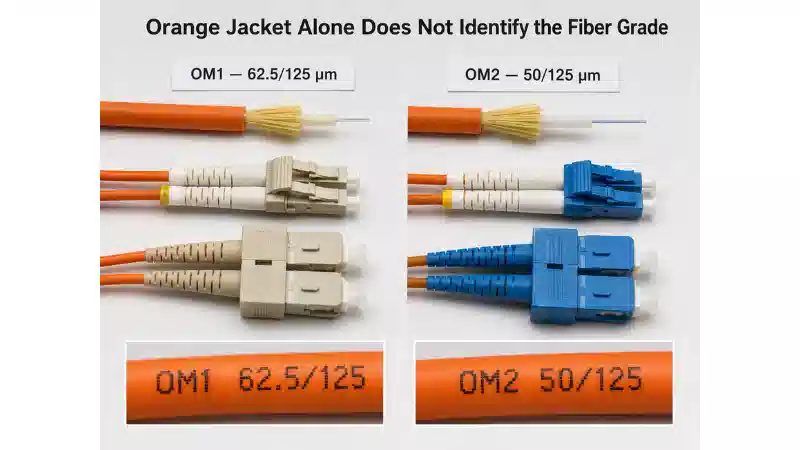
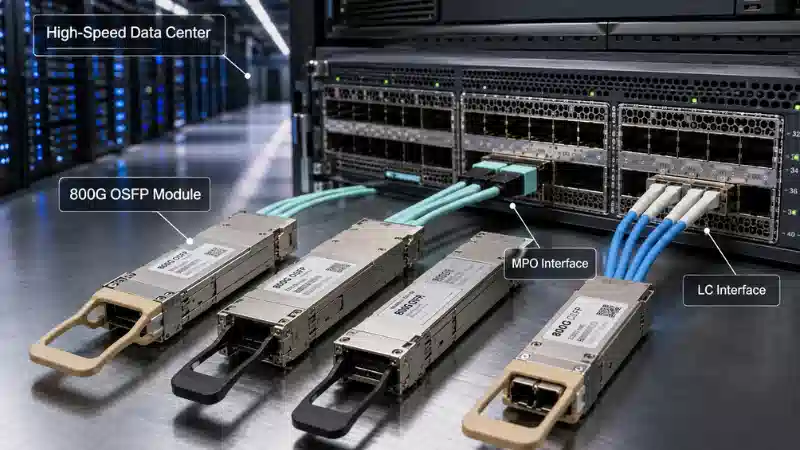
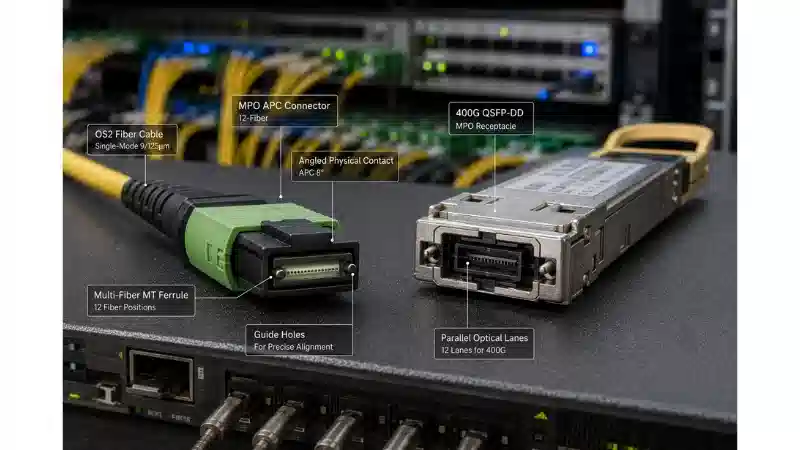
The aqua/teal adapters? Those are for OM3 or OM4 multimode. The blue ones are for singlemode OS2. Green is for APC (angled physical contact) connectors. The thing is, you can technically use the "wrong" color adapter and it might still work, but you shouldn't. It's not just about the color - the internal geometry is actually different for APC versus UPC (ultra physical contact) connections.
APC connectors have an 8-degree angle on the ferrule end face. This angle needs to mate with another angled surface, obviously, and the adapter has to accommodate this. If you try to mate an APC with a UPC... I mean, you can do it, but the return loss is going to be terrible. You're basically just creating a nice little reflection point for your light signal to bounce around in.

The Ferrule Alignment Game
Here's where things get weirdly precise. The MPO ferrule (that's the part that actually holds the fibers) has a width of about 6.4mm and a height of 2.5mm. Not huge. Inside that space, you've got 12 fibers arranged in a single row, each spaced 250 microns apart.
The adapter's job is to make sure that when two ferrules come together, those fiber cores align within a micron or two. How? The guide pins slot into those holes I mentioned earlier, and the sleeve applies just enough radial pressure to keep everything centered. Too much pressure and you might damage the ferrule. Too little and you get lateral offset, which means higher insertion loss.
There's also this spring mechanism in most MPO connectors (not the adapter itself, but work with me here) that pushes the ferrule forward. When you insert the connector into the adapter, that spring compresses slightly, ensuring the ferrule end faces are pressed together. The adapter just provides the channel and alignment - it's more passive than you'd think, considering how critical it is.
Key vs. Keyless (This Confused Me for Months)
Okay, so MPO connectors come in keyed and keyless versions. The key is a little rectangular nub on one side of the connector. The adapter has to match - if you've got keyed connectors, you need a keyed adapter with a corresponding slot.
Why does this matter? Polarity. The key determines which way the connector can be inserted, which determines which fiber lands where on the other side. Get this wrong and fiber 1 might connect to fiber 12 on the other end. Your signal goes nowhere useful, and you spend an hour troubleshooting before you realize you mixed up keyed and keyless connectors.
I've done this. Multiple times. It's embarrassing every time.
The keyless adapters are symmetrical, so you can insert the connector either way. This gives you flexibility for different polarity methods, but it also means you need to actually know what polarity method you're using. Method A? Method B? Method C? Each one has a different fiber mapping, and the adapter doesn't care - it'll happily connect things the wrong way if you let it.

Types and Footprints
MPO adapters come in different physical formats. The most common is the standard MPO footprint - it's rectangular, about the size of your thumbnail, with mounting flanges. Then there's the SC footprint version, which is designed to fit in spaces where SC connectors normally go. This is clever because it means you can upgrade from duplex SC connections to 12-fiber MPO without redesigning your whole patch panel.
There's also what they call "Type A" and "Type B" adapters for some applications, though honestly, the naming gets confusing because different manufacturers use different terminology. Type A usually means one flange is higher than the other (it's actually called "offset flanges"), which helps with density in panels. Type B has the flanges at the same height.
Some adapters are bulkhead mount, some are panel mount, some snap into keystone frames. The mechanics change slightly for each, but the core alignment function stays the same.
The Physical Contact Situation
This is important - the adapter doesn't create the physical contact between fibers. It just enables it. The actual connection happens at the ferrule end faces, where the fiber cores meet. In a UPC connection, both end faces are polished to a slight dome (radius of curvature around 10-25mm typically). When pressed together, this dome shape ensures the fiber cores actually touch at the center while the outer edges of the ferrule might have a tiny air gap.
The adapter's role is to make sure those domes line up concentrically. Any angular misalignment (even half a degree) and you get increased insertion loss. The tighter the sleeve, the better the alignment, but there's a practical limit because you need to be able to insert and remove the connector without special tools.
Insertion Loss and What Actually Causes It
People always want to know about insertion loss, and they expect a simple number. "How much loss does the adapter add?" But it's not that straightforward.
In an ideal world, the adapter itself adds zero loss. It's just a sleeve, right? The loss comes from misalignment - lateral offset, angular offset, or gaps between the fiber end faces. A good MPO adapter with properly polished connectors should give you less than 0.35 dB insertion loss per mating pair. Often you'll see numbers like 0.15-0.25 dB.
But here's the thing - that number includes the connector, the polish quality, the fiber cleanliness, and yes, the adapter's alignment precision. You can't really separate them. A perfect adapter with a badly polished connector will still give you high loss. A perfect connector with a cheap adapter that has loose tolerances? Also high loss.
The guide pin fit is probably the most critical factor the adapter controls. If the pin holes are worn out or manufactured out of spec, you get lateral offset. Even 0.5 microns of offset can add 0.1 dB of loss in singlemode applications.

Cleaning (Which Everyone Forgets)
Nobody talks about this enough, but adapter sleeves get dirty. Dust gets in there, oil from fingers if you touch the wrong part, sometimes debris from connector ferrules that aren't perfectly polished. This stuff accumulates inside the ceramic sleeve and causes problems.
You're supposed to clean the adapter between uses, especially if you're doing a lot of connect/disconnect cycles. There are these little swabs specifically designed for MPO adapter cleaning - they look like Q-tips but with a paddle-shaped foam tip that fits the rectangular opening.
I'll be honest, I've probably skipped this step more times than I should have. You get away with it until you don't, and then you're troubleshooting high loss that magically disappears when you finally clean the adapter properly.
The Durability Question
How many times can you mate and unmate an MPO connection? The spec usually says 500 cycles minimum. The adapter sleeve should handle this fine if it's decent quality. The connector ferrule end face polish degrades faster than the adapter does in most cases.
The phosphor bronze sleeves wear down eventually - the radial spring force decreases as the metal fatigues. Ceramic sleeves are more durable but also more expensive. Some adapters use a hybrid design with ceramic alignment pins and bronze springs, trying to get the best of both worlds.
In practice, I've seen adapters still working fine after thousands of cycles, and I've seen cheap ones fail after a hundred. You get what you pay for, which sounds like a cliché but it's painfully true with precision fiber optics.
The Whole Polarity Thing Again (Because It's That Important)
I mentioned polarity earlier, but it's worth diving deeper because it's where most mistakes happen. The adapter doesn't enforce polarity - it just connects whatever you plug in. You need to understand your system's polarity method.
Method A uses a key-up to key-down connection. Fiber 1 on one end connects to fiber 12 on the other end, fiber 2 to 11, and so on. This requires a standard keyed adapter.
Method B uses a key-up to key-up connection with a flipped cable or a special "Type B" adapter that rotates the fiber positions.
Method C uses key-up to key-up with pairs flipped inside the connector itself.
The adapter is involved in all of this, but it's not smart - it doesn't know which method you're using. It'll happily let you mix methods and create a connection that physically works but logically doesn't. This is why labeling matters. This is why documentation matters. This is why you test before you put something into production.

When Things Go Wrong
Sometimes the adapter is the problem, sometimes it isn't. Typical troubleshooting: high insertion loss can mean dirty adapter, worn guide pin holes, mismatched connector types (APC in UPC adapter), or just a bad connector.
If you're getting inconsistent readings - like the loss changes when you remove and reinsert the connector - that's usually a polish or contamination issue, not the adapter. If the loss is consistently high across multiple connectors, then yeah, check the adapter.
One weird failure mode I've encountered: cracked ceramic sleeves. This happens if someone over-torques something during installation or drops the panel. The ceramic fractures, the alignment goes to hell, and suddenly nothing works. It's not common, but when it happens, it's a pain to diagnose because the adapter looks fine from the outside.
The Future? Maybe?
There's development work on 16-fiber and 24-fiber MPO adapters, though 12-fiber is still the standard. Some manufacturers are working on "self-cleaning" adapter designs with built-in shutter mechanisms, but I haven't seen those in wide deployment yet.
The push is always toward higher density and lower loss. Every fraction of a dB matters when you're running long distances or high channel counts. The adapter has to keep up with connector improvements - better polish, tighter tolerances, new materials.
So that's basically how MPO adapters work. They're alignment sleeves with precision guide pin holes, designed to mate two MPO connectors with minimal loss. Simple concept, devilish execution. The color coding helps prevent mistakes, the keying enforces polarity (if you use it right), and the whole system depends on tolerances measured in microns.
Not bad for what looks like a little plastic block, right?