An outdoor fiber distribution box is a sealed enclosure that protects, organizes, splices, and distributes optical fibers at an outdoor access point in an FTTx network. For FTTH, FTTB, and FTTC deployments, the right box is not the one with the highest port count. It is the one that matches your cable route, installation environment, connector type, splice capacity, splitter plan, and room for future expansion.
This guide is written for installers, contractors, and telecom operators who buy these enclosures in volume. It starts with a scenario-based selection table, then works through port count and splice capacity, IP rating, loaded versus unloaded configuration, mounting method, connector and splitter options, real field-installation notes, a specification checklist with a sample RFQ, and the ordering mistakes that most often lead to field rework.
Quick Selection Guide
If you only have a minute, start here. The table below maps common access-point scenarios to a sensible starting configuration. Treat it as typical selection guidance rather than a fixed rule, because the final choice always depends on your optical budget, fiber count, and how the access point sits inside the wider PON design.
| Project scenario | Typical port count | Splitter option | Mounting | Connector | Main concern |
|---|---|---|---|---|---|
| Single-family home or small drop point | 4–8 | 1×4 or 1×8 | Wall or pole | SC/APC | Sealed cable entry, easy maintenance access |
| Small apartment building or MDU | 12–16 | 1×8 or 1×16 | Wall | SC/APC | Splice tray capacity and slack storage |
| Residential street access point | 16 | 1×16 | Pole | SC/APC | Drop cable exits and cable strain relief |
| Rural pole-mounted FTTH | 8–16 | 1×8 or 1×16 | Pole or aerial | SC/APC | UV resistance, vibration, weather sealing |
| High-density building (FTTB) | 24 or more | 1×16 or 1×32, often multiple | Wall or cabinet | SC/APC or LC | Expansion reserve, internal routing, technician access |

What Is an Outdoor Fiber Distribution Box?
An outdoor fiber distribution box is a protective enclosure installed at a fiber access point, usually on a wall, pole, building exterior, or street-side location. It connects an incoming feeder or distribution cable to outgoing drop cables, so optical signals can be terminated, spliced, split, and distributed to multiple subscribers. Its job is to keep those connections organized and shielded from dust, rain, moisture, UV exposure, accidental contact, and installation stress.
Depending on the design and the catalog, the same hardware may be called an outdoor fiber distribution unit, an outdoor fiber termination box, an FTTH distribution box, a fiber optic splitter box, an outdoor fiber enclosure, or a fiber access terminal (FAT). The label matters less than one question: does the enclosure actually support your network design?
What an Outdoor Fiber Distribution Box Does in an FTTH Network
In an FTTH project, the box normally sits between the feeder cable and the final drop cable, managing the transition from a higher-count fiber cable to individual subscriber connections. A well-designed enclosure can:
- Terminate incoming fiber cables and protect fusion splices
- Hold fiber pigtails, optical adapters, and a PLC splitter
- Route fibers safely and store slack inside the enclosure
- Connect feeder cables to drop cables for several subscribers
- Leave access for maintenance, repair, and future service activation
For a small drop point the box may only terminate and protect a few fibers. For a denser access network it has to support multiple drop cables, one or more splitter modules, and tidy fiber management so technicians can return later without disturbing live services.
Key Components to Check Before Buying
Before comparing prices, understand the parts that decide whether an enclosure will actually work on site.
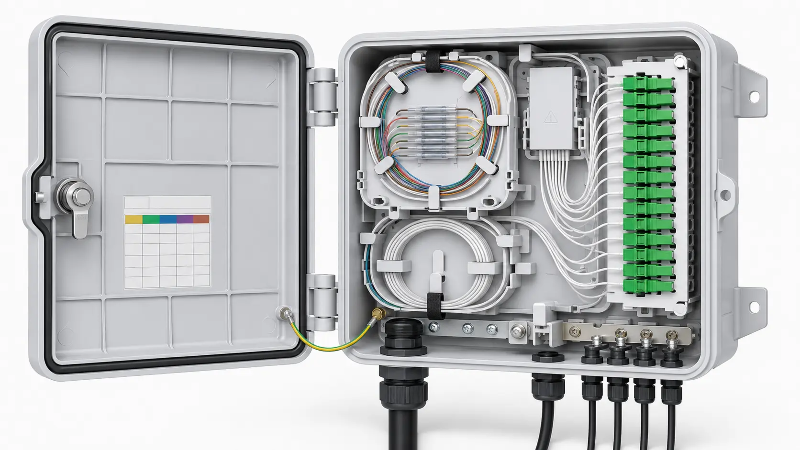
Cable entry and drop cable exits
The cable entry is where the feeder cable enters; the drop exits carry outgoing cables to subscribers. For outdoor use these openings must be sealed correctly, and the gland or grommet must match your real cable diameter. A common and expensive mistake is buying a box with enough ports but not enough physical cable entry space, or a gland that does not fit the drop cable, which forces field rework.
Splice tray
The splice tray stores and protects fusion splices. If you splice pigtails or cables directly, check the maximum splice count, the number of trays, whether trays are removable or stacked, and the routing path from the tray to the adapters. The tray also has to accept your fiber pigtails and heat-shrink splice protectors without forcing tight bends.
Adapter panel
The adapter panel holds the optical adapters that interface internal pigtails with external patch or drop connections. FTTH networks commonly use SC/APC, but your choice must match the rest of the network, so confirm the panel layout and density against your fiber optic adapter requirements before ordering. Do not mix connector polish types unless the system design specifically allows it.
PLC splitter space
Many FTTH boxes are built to hold a PLC splitter such as a 1×4, 1×8, 1×16, or 1×32 module. If the box is a splitter distribution point, confirm the splitter format and mounting space (mini, cassette, or steel-tube) and whether there is parking space for unused ports. A box can have enough adapter ports yet still lack room for the PLC splitter you plan to install.
Fiber routing and bend-radius protection
Good internal routing keeps fibers organized and prevents tight bends, which matters most in small boxes where space is limited. Look for clear routing channels, management rings, protected slack storage, and separation between the incoming cable, pigtails, splitter, and drop cables.
Loaded vs Unloaded Fiber Distribution Boxes
One of the most important purchasing decisions is whether to buy a loaded or unloaded box.
| Option | What it usually includes | Best for | Possible limitation |
|---|---|---|---|
| Loaded fiber distribution box | Adapters, pigtails, splice tray, sometimes a splitter | Faster installation and repeatable, standardized FTTH rollouts | Less flexibility if connector type or splitter plan changes |
| Unloaded fiber distribution box | Empty enclosure or basic tray structure | Custom designs and flexible component selection | Needs separate adapters, pigtails, and splitters, plus more assembly |
A loaded box is usually the better choice when the specification is fixed and the same configuration repeats across many sites, because it saves installation time and reduces missing parts. An unloaded box wins when the project needs custom connectors, special splitter ratios, staged deployment, or different adapter types across locations. If you are unsure, price a full bill of materials first: the cost of missing pigtails, adapters, splice protectors, or splitter modules on site is often higher than the difference between the two versions.
Port Count Is Not the Same as Splice Capacity
A 16-port box does not always support 16 or more splices, and a high-splice box does not always have enough adapter positions. Size for both your current connections and realistic future growth.
Small access points: 4 to 8 ports
A 4-port or 8-port box suits small buildings, single access points, CCTV nodes, small wireless sites, or low-density FTTH drops: places with few drop cables, limited space, and no large splitter.
Standard FTTH drops: 12 to 16 ports
A 12-port or 16-port box is the common choice for residential access, small apartment buildings, and street-level distribution points that serve several subscribers with a 1×8 or 1×16 splitter, SC adapter termination, and fusion-spliced pigtails.
Higher-density distribution: 24 ports and above
A 24-port or larger box fits bigger buildings and denser subscriber zones, or access points that need room for expansion. Before choosing high density, confirm the available installation space, cable entry capacity, drop cable management, splitter arrangement, and technician access. A higher port count is not automatically better: a crowded enclosure makes installation and troubleshooting harder.
IP Rating: IP65, IP66 or IP67?
The IP rating describes how well an enclosure resists dust and water ingress. The two-digit code is defined by the IEC 60529 standard, where the first digit covers solid objects and dust and the second covers water. For outdoor fiber distribution boxes, IP65, IP66, and IP67 are the common options.
| IP rating | General meaning | Typical use |
|---|---|---|
| IP65 | Dust-tight, protected against water jets | General outdoor wall or pole installation with rain exposure |
| IP66 | Dust-tight, protected against powerful water jets | Harsher sites, heavy rain, stronger washdown risk |
| IP67 | Dust-tight, protected against temporary immersion | Locations with short-term water accumulation or flooding risk |
Do not pick an IP rating by chasing the highest number. The sealing structure, cable glands, gasket quality, mounting angle, drain path, and UV resistance matter just as much. An IP-rated shell can still fail in the field if the cable entry is not sealed correctly or the installer uses the wrong cable diameter for the gland.
Mounting: Wall, Pole or Aerial?
The mounting method should match the site and the way technicians will access the box for service.
| Mounting type | Best for | What to check |
|---|---|---|
| Wall mount | Building exteriors, telecom rooms, corridors, commercial premises | Screw holes, backplate strength, cable entry direction |
| Pole mount | FTTH access points, street-side distribution, rural networks | Pole straps, brackets, vibration resistance, technician access |
| Aerial installation | Overhead cable routes and aerial distribution | Suspension method, weather exposure, cable strain relief |
On pole and aerial routes, pay particular attention to cable strain relief: the enclosure should not carry the mechanical load of the cable run unless it is designed for it. For tower and pole access points, purpose-built outdoor multiport terminal and MST boxes are often a better fit than a general indoor-style enclosure pushed outdoors.

Connector, Pigtail and Splitter Options
A distribution box has to match the optical components used everywhere else in the network.
SC/APC vs SC/UPC
SC/APC connectors are widely used in FTTH and PON networks because the angled polish lowers back reflection, which helps on links carrying analog video and on long PON splits. SC/UPC is also common in many fiber systems. The rule is simple: match the connector type and polish to your existing equipment and cable assemblies. Do not mate APC and UPC as a standard practice, because the polish geometry differs and it degrades optical performance. If you terminate in the field, confirm the box works with your field-assembly SC/APC connectors.
LC options
LC adapters appear where density is higher or the equipment uses LC interfaces, though LC is less common than SC at many FTTH field distribution points. If you need LC, confirm the adapter plate supports LC duplex or simplex.
Pigtail length and fiber type
Check pigtail length, fiber type, connector type, and jacket. Most FTTH access networks run single-mode fiber, and bend-insensitive fiber to the ITU-T G.657 recommendation is a sensible default inside compact enclosures because it tolerates the tight routing found in small boxes. In loaded boxes, confirm whether pigtails are pre-installed; in unloaded boxes, order them separately.
PLC splitter ratio
If the box includes a splitter, fix the ratio before ordering. Common options are 1×4, 1×8, 1×16, 1×32, 2×8, and 2×16. Choose the ratio from the optical budget, network architecture, subscriber density, and expansion plan, not just from the number of free ports. A higher split ratio increases insertion loss, so it has to fit the power budget of your PON link rather than only the port count of the box.
Typical Configuration Examples
Concrete configurations make the trade-offs clearer. Three examples that recur in real rollouts:
- 8-port wall-mount FTTH box: SC/APC adapters, IP65 ABS+PC enclosure, a single splice tray, a 1×8 splitter, and glands sized for a 5 mm drop cable. A typical small-building or low-density drop point.
- 16-port pole-mount access point: a 1×16 SC/APC splitter, 16 SC/APC adapters with pre-installed pigtails, IP65 with a UV-resistant housing, pole-mount brackets, and reinforced strain relief for the drop cable exits.
- 24-port-plus FTTB enclosure: multiple splice trays, one or two 1×16 splitters, expansion reserve for new subscribers, and routing channels that keep feeder, splitter, and drop fibers separated for easier maintenance.
Field Installation Notes
The points that cause the most rework on site are rarely about the headline specification:
- An undersized or oversized cable gland is a frequent cause of return visits, because a poor seal lets in moisture even when the enclosure itself is correctly IP-rated.
- On pole and aerial installs, fix the drop cable so its weight is not carried by the enclosure or the splice tray.
- Leave slack and respect the fiber bend radius, since crowded boxes are where macrobending loss and damaged fibers show up later.
- Do not fill every port on day one. Spare capacity is what lets you add subscribers, reroute, or repair without swapping the box.
- Long-term protection comes from installation quality (glands, gaskets, mounting direction, and proper closure) as much as from the printed IP number.
Common Mistakes When Buying Outdoor Fiber Distribution Boxes
Choosing by port count alone
Port count matters, but it is not the whole story. Also check splice capacity, splitter space, cable entry size, adapter type, and internal routing.
Ignoring cable diameter
A box can be rated for outdoor use yet still not fit the actual feeder or drop cable. Always confirm gland size and cable entry range against your cable diameters, because a wrong gland size usually means field rework.
Forgetting future expansion
If every port is used immediately, there is no room for new subscribers, repairs, rerouting, or spare fibers. Leave reasonable capacity for growth.
Mixing connector types
Select SC/APC, SC/UPC, or LC to match the existing network. Mixing them creates avoidable performance and maintenance problems.
Assuming the IP rating solves everything
The IP rating matters, but installation quality decides long-term protection. Glands, seals, mounting direction, and proper closure all count.
FAQ
What is the difference between a fiber distribution box and a fiber termination box?
A fiber termination box focuses on terminating and protecting fiber connections. A fiber distribution box usually does more: termination, splicing, splitting, and distribution to several outgoing cables. In many catalogs the two terms overlap, so judge the product by its internal layout rather than its name.
Which do I need: an 8-port, 16-port, or 24-port FTTH distribution box?
It depends on drop cables, subscribers, splitter ratio, and growth plans. Small access points are often fine with 4 to 8 ports; standard FTTH distribution typically uses 12 to 16 ports; denser areas or sites that need expansion headroom move to 24 ports or more.
Can I order a custom loaded outdoor fiber distribution box?
Yes. Many suppliers build loaded boxes to a specification (your chosen splitter ratio, adapter type, pigtail length, IP rating, material, and mounting accessories) and ship them ready to install, which is useful for repeatable rollouts. Provide the configuration details up front so the build matches your sites.
What information should I provide before requesting a quotation?
At minimum: port count, splice capacity, connector and polish type, PLC splitter ratio, loaded or unloaded configuration, IP rating, cable diameters, mounting method, and quantity. The checklist above covers the rest and prevents back-and-forth on missing parts.
Is IP65 enough for an outdoor fiber distribution box?
IP65 suits most general outdoor applications exposed to dust and rain. For harsher environments, stronger water exposure, or possible temporary immersion, IP66 or IP67 may be more appropriate, but only if the glands and sealing are installed correctly.
Can an outdoor fiber distribution box hold a PLC splitter?
Many can, but not all. Check the splitter type, size, ratio, and mounting space before ordering, and confirm there is parking space for any unused splitter ports.
What connector type is best for FTTH distribution boxes?
SC/APC is common in FTTH, but the best connector is the one that matches your existing network, optical equipment, and cable assemblies.
Final Thoughts
Choosing an outdoor fiber distribution box is about more than buying a weatherproof shell. The right box matches your fiber count, splitter plan, connector type, mounting method, IP rating, splice capacity, and future maintenance needs. Start from the network layout, then select the configuration that supports your feeder cable, drop cables, pigtails, adapters, splitter, and installation environment. A well-matched enclosure cuts installation time, protects the optical link, and makes the next expansion far easier.