Use a straight-through Ethernet cable for almost every modern connection, and reach for a crossover Ethernet cable only when you are directly linking two similar devices that do not support Auto MDI-X. For a typical office or home network today, that means straight-through patch cables for nearly every switch, router, patch panel, access point, IP camera, and workstation link. The crossover cable is the exception, not the default.
The reason this question still matters is not the cable category, such as Cat5e or Cat6. It is the wiring order at the two RJ45 ends. Understanding that difference saves real time when you are troubleshooting an old switch with no link light, terminating your own cable, or deciding what to buy for a new install.
Straight-Through or Crossover?
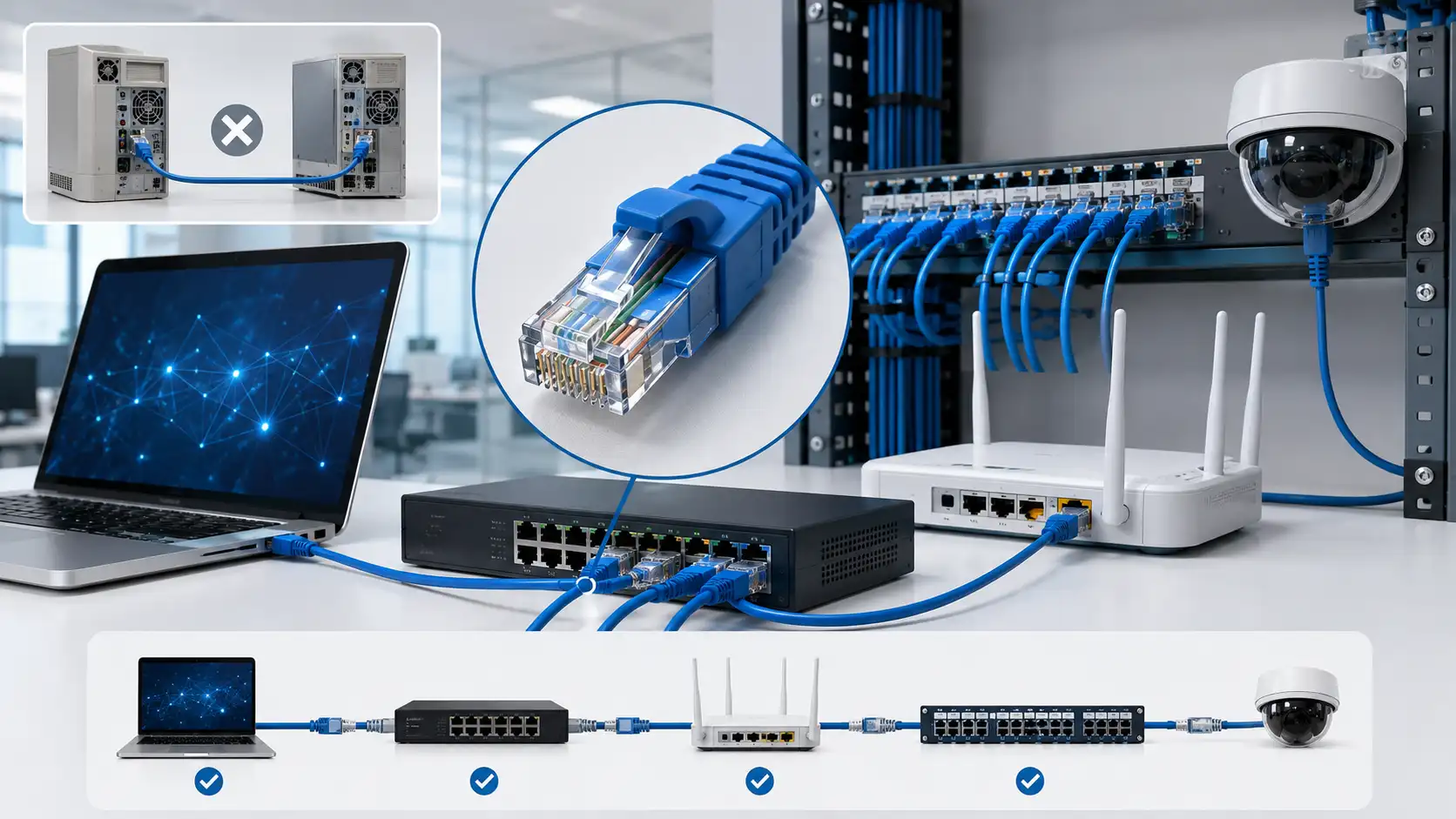
Use a straight-through cable when you connect two different kinds of devices:
- Computer to switch
- Computer or router LAN port to switch
- Patch panel to switch, or patch panel to wall outlet
- IP camera or access point to a PoE switch
- Printer to switch
Use a crossover cable only when you directly connect two similar devices, especially older ones, with no switch in between:
- Computer to computer
- Switch to switch (older models)
- Router to router, or hub to hub
- Any legacy 10/100 device with Auto MDI-X disabled or unsupported
If both devices are reasonably modern and support Auto MDI-X, either cable will work, because the port fixes the wiring internally. So when in doubt, buy straight-through. It is the safer, cheaper, and far more common choice. If you want the full pinout-level breakdown of the crossover variant specifically, we cover that in our dedicated guide to the crossover LAN cable pinout and when you still need one.
What a Straight-Through Ethernet Cable Is
A straight-through cable keeps the same wiring order on both ends. Pin 1 connects to pin 1, pin 2 to pin 2, pin 3 to pin 3, and so on through pin 8. The wire pairs pass straight through from one connector to the other, which is where the name comes from.
A straight-through cable is terminated the same way at both ends, using either T568A on both ends or T568B on both ends. In practice, T568B-to-T568B is the most widely used scheme in North American commercial and residential installations, although T568A and T568B are both permitted under the ANSI/TIA-568.2-D wiring standards and deliver identical electrical performance when used consistently. The only thing that matters is that both ends match.
This is the cable you will use for the overwhelming majority of a structured cabling job: laptops and desktops to switches, routers to switches, switches to patch panels, and PoE devices such as cameras and access points back to a PoE switch.
What a Crossover Ethernet Cable Is
A crossover cable deliberately uses different wiring on each end so that two similar devices can talk directly. Instead of keeping every pin in place, it swaps the transmit and receive pairs. The common way to build one is T568A on one end and T568B on the other.
For 10/100 Mbps Ethernet (10BASE-T and 100BASE-TX), the meaningful swap happens between pins 1 and 3, and between pins 2 and 6, because those standards use one dedicated pair for transmit and one for receive in each direction. Connecting two same-type ports at these speeds requires crossing each device's transmit pair to the other's receive pair, which is exactly what the crossover cable does mechanically.
Here is a detail many guides skip: 1000BASE-T (Gigabit) does not work the same way. Gigabit and faster use all four pairs for simultaneous bidirectional transmission, so there are no fixed transmit and receive pairs to swap. This is part of why crossover cables have largely faded from everyday use, and why Auto MDI-X became standard.
Today, crossover cables still earn their place in specific situations: legacy 10/100 switches and hubs, older industrial control equipment, lab benches where you are studying Ethernet wiring, or any port with Auto MDI-X turned off or unavailable.
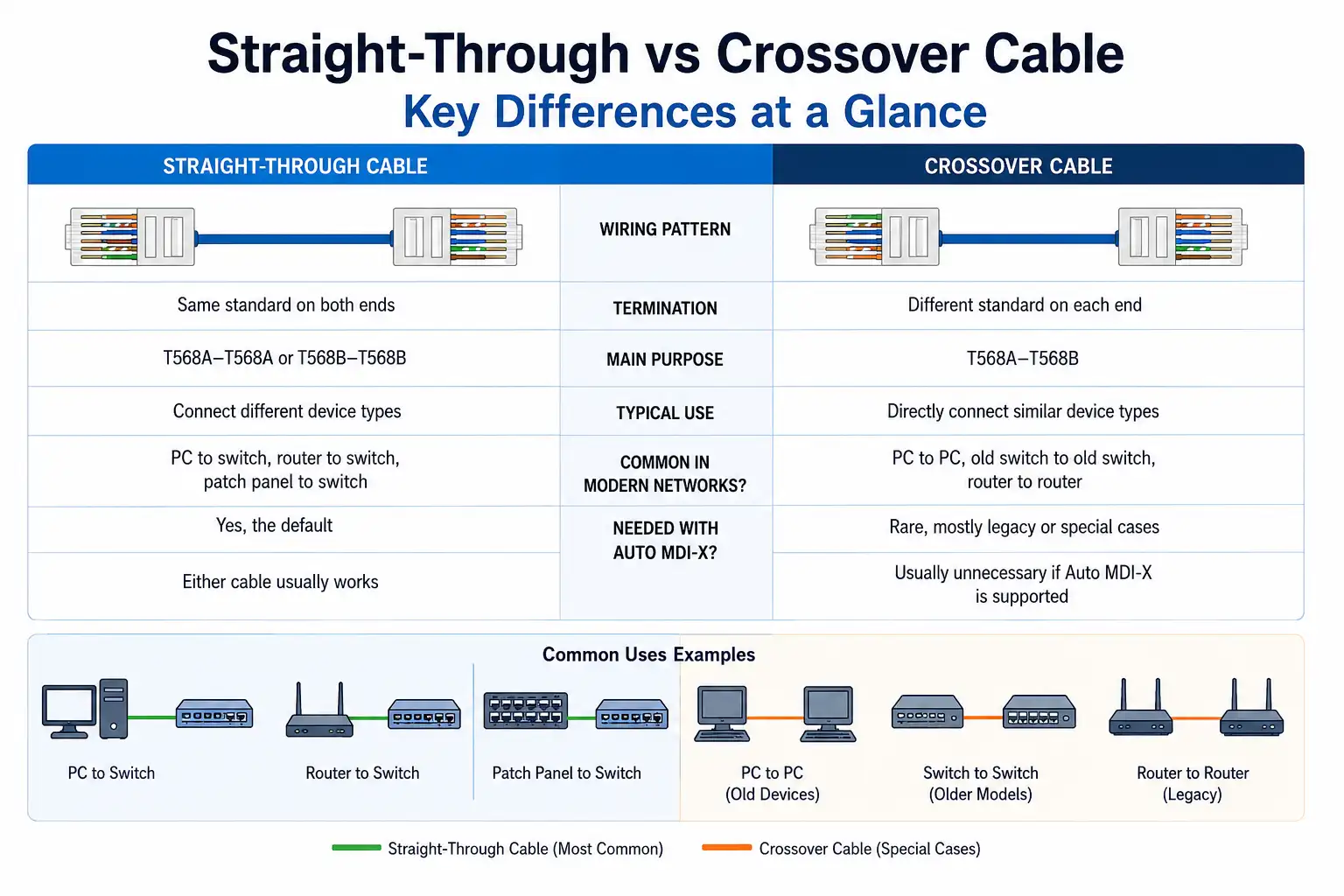
Key Differences at a Glance
| Feature | Straight-Through Cable | Crossover Cable |
|---|---|---|
| Wiring pattern | Same standard on both ends | Different standard on each end |
| Common termination | T568A–T568A or T568B–T568B | T568A–T568B |
| Main purpose | Connect different device types | Directly connect similar device types |
| Typical use | PC to switch, router to switch, patch panel to switch | PC to PC, old switch to old switch |
| Common in modern networks? | Yes, the default | Rare, mostly legacy or special cases |
| Needed with Auto MDI-X? | Either cable usually works | Usually unnecessary if Auto MDI-X is supported |
The most practical takeaway is that the cable category (Cat5e, Cat6, Cat6A) tells you nothing about whether a cable is straight-through or crossover. Category describes performance and bandwidth. Straight-through versus crossover describes the RJ45 wiring order. They are independent choices. If you are still deciding which category to buy, our comparison of Cat5e vs Cat6 cable walks through the performance trade-offs.
T568A and T568B Pinouts Explained
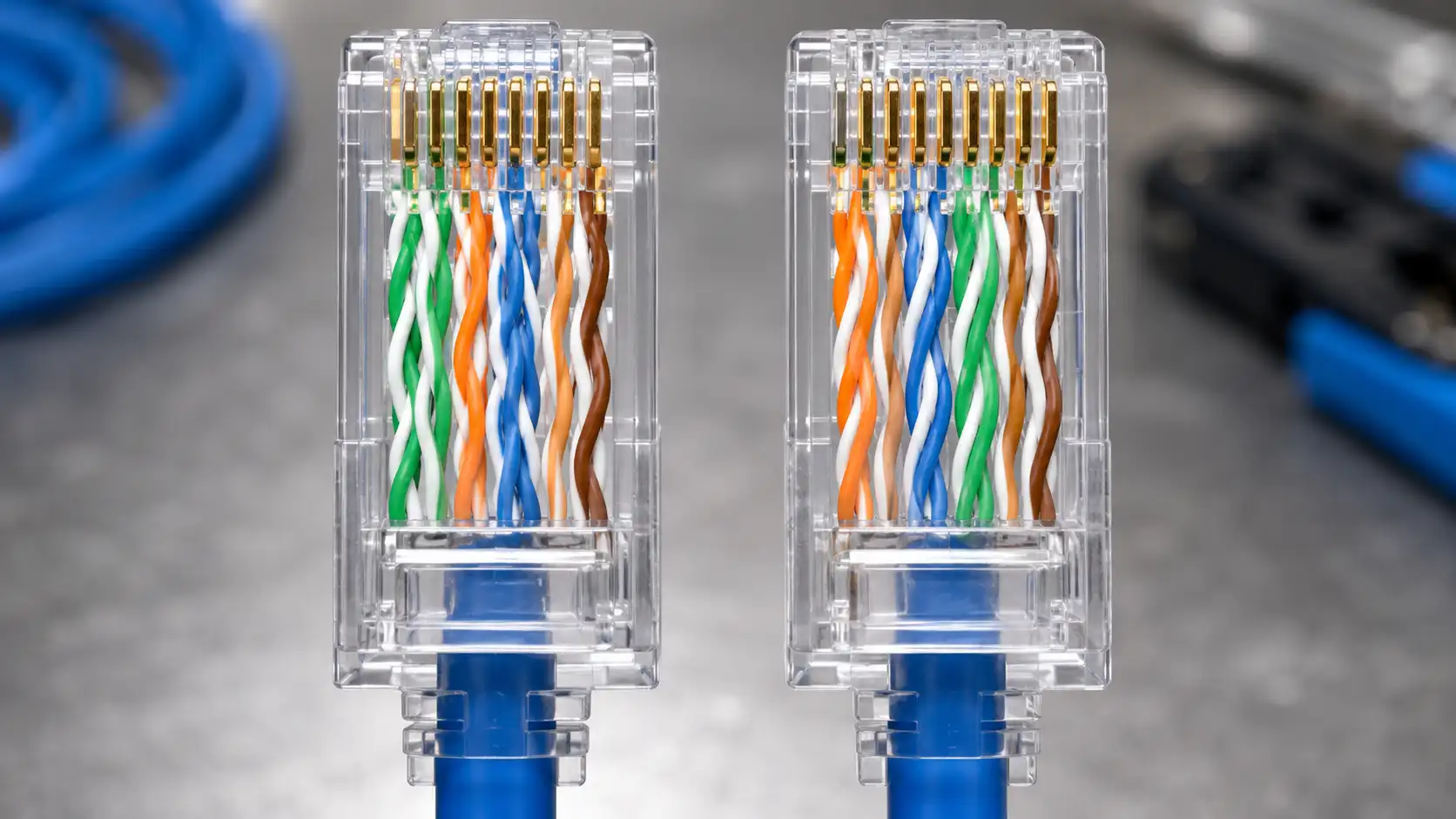
To make sense of both cable types, you need the two RJ45 color standards. They differ only in the position of the orange and green pairs.
T568A Color Code
| Pin | Wire Color |
|---|---|
| 1 | White/Green |
| 2 | Green |
| 3 | White/Orange |
| 4 | Blue |
| 5 | White/Blue |
| 6 | Orange |
| 7 | White/Brown |
| 8 | Brown |
T568B Color Code
| Pin | Wire Color |
|---|---|
| 1 | White/Orange |
| 2 | Orange |
| 3 | White/Green |
| 4 | Blue |
| 5 | White/Blue |
| 6 | Green |
| 7 | White/Brown |
| 8 | Brown |
A straight-through cable uses the same standard on both ends, for example T568B on both. A crossover cable uses one standard on one end and the other on the opposite end, T568A to T568B. Note that pins 4, 5, 7, and 8 are identical in both standards. When terminating your own plugs, a careful crimp and a tester check are what separate a reliable link from an intermittent one; if you are new to crimping, follow a step-by-step method such as our RJ45 Cat5e crimping guide.
Do Modern Devices Still Need Crossover Cables?
For most connections, no. The reason is Auto MDI-X, a feature built into the vast majority of current Ethernet ports. Auto MDI-X lets a device detect whether the cable is straight-through or crossover and adjust its transmit and receive pairs internally, so a modern switch, router, or network adapter typically works with either cable.

This is not a vendor marketing claim, it is in the standard. Automatic MDI/MDI-X is defined in IEEE 802.3, Clause 40.4.4 (Automatic MDI/MDI-X Configuration), and its explicit purpose is to remove the dependency on crossover cables when connecting similar devices. One important caveat from the standard: for Auto MDI-X to operate correctly, the port's speed and duplex should be set to auto-negotiate.
So when does the crossover cable still matter? Consider it when you are:
- Connecting old 10/100 switches or hubs to each other
- Working with legacy industrial equipment or fixed MDI / MDI-X ports
- Dealing with a port where Auto MDI-X is disabled
- Studying or bench-testing Ethernet wiring
For ordinary purchasing and installation, choose quality straight-through patch cables unless you have a specific, known reason to do otherwise.
How to Identify the Cable You Already Have
There are three reliable ways to tell straight-through from crossover.

1. Compare the RJ45 Wire Colors
Hold both connectors side by side, clips facing away from you and gold contacts up. Read the color order left to right. If both ends match, it is straight-through. If one end follows T568A and the other T568B, it is a crossover.
2. Use a Cable Tester
A basic Ethernet cable tester shows whether each pin maps straight through or crosses over, and it is the most reliable method for installed runs or cables you cannot inspect visually. A good tester also flags open wires, shorts, reversed pairs, and split pairs, which is exactly the kind of fault that a visual check misses. If you are assembling a field kit, our overview of a visual fault locator and basic test gear covers the tooling side in more depth.
3. Check the Label or Packaging
Some crossover cables are marked "crossover," "X-over," or "cross." Standard patch cables are usually straight-through, but a label is not a guarantee. When the connection matters, verify the pinout with a tester rather than trusting the print.
A Field Troubleshooting Example
A common real-world scenario: you are uplinking two switches in an older lab rack and the link light never comes on. Before swapping hardware, work the cable problem first. Try a known-good straight-through cable. If the modern switch supports Auto MDI-X, it will adjust and the link will come up, which immediately tells you the original cable, not the port, was the issue. If both switches are genuinely old 10/100 units with Auto MDI-X unavailable, a crossover cable may be exactly what the pair needs.
When the link still fails with a cable you trust, put a tester on it. The classic culprit on a hand-terminated cable is a split pair: continuity looks fine pin to pin, but the pair geometry is wrong, so the link either negotiates at a lower speed or drops under load. That single test reading saves far more time than guessing.
Common Mistakes to Avoid
Confusing cable category with wiring type
A Cat6 cable can be straight-through or crossover, and so can Cat5e and Cat6A. Category is about performance. Wiring type is about pin order. Never assume one tells you the other.
Mixing T568A and T568B by accident
Putting T568A on one end and T568B on the other creates a crossover cable. That is fine if you intended it, but it is a frequent unintentional error on standard patch cables. For a normal cable, use the same standard on both ends.
Untwisting too much at the connector
Ethernet relies on twisted pairs to control interference. Keep the pairs twisted as close to the plug as possible. Per ANSI/TIA guidance, the practical untwist target at termination is around 13 mm (0.5 inch). Excess untwisting degrades performance, and the damage shows up most at Gigabit speeds.
Assuming Auto MDI-X fixes everything
Auto MDI-X corrects straight-through versus crossover wiring. It does not repair a bad cable. Split pairs, poor crimps, damaged conductors, or wrong pin mapping will still cause failures or degraded links regardless of Auto MDI-X.
Ignoring jacket rating on permanent runs
For in-wall or plenum-space cabling, the wiring type is only one decision. Use the correct jacket rating, such as riser or plenum, where required, and follow your local building codes rather than a one-size-fits-all rule.
Troubleshooting Checklist
If an Ethernet link is not working, run through these before replacing equipment:
- Check the link lights. No light? Start with a known-good straight-through cable.
- Confirm the device pair. Are you connecting two similar devices directly, such as switch to switch or PC to PC?
- Check Auto MDI-X support. If one or both devices are old, a crossover cable may be required.
- Test the cable. Verify pin continuity and pair mapping, and look specifically for split pairs.
- Inspect the connectors. Look for poor crimps, bent contacts, or a damaged jacket.
- Check speed negotiation. A marginal cable may link at a lower speed or drop intermittently.
If the same device pair works with a different cable, the original cable is the problem. If neither cable works, look at port settings, device configuration, or a hardware fault.
Which Cable for Which Connection?
| Your connection | Recommended cable | Notes |
|---|---|---|
| PC to switch | Straight-through | Standard modern LAN |
| Router LAN to switch | Straight-through | Most common link |
| Switch to switch (modern) | Straight-through usually works | Auto MDI-X handles it |
| Switch to switch (old 10/100) | Crossover may be needed | Check port support first |
| PC to PC (legacy NICs) | Crossover | Direct legacy link |
| PoE camera to PoE switch | Straight-through | Use the correct category and rating |
Which Cable Should You Buy?
For nearly every network, buy straight-through Ethernet patch cables. They handle computers, switches, routers, access points, IP cameras, printers, and patch panels. Match the category to your performance needs:
- Cat5e: fine for many basic Gigabit Ethernet connections
- Cat6: a common choice for office and home networks
- Cat6A: better for higher-performance and 10G-capable links over longer supported distances
- Shielded cable: useful in high-interference environments when properly grounded
- Outdoor-rated or plenum/riser-rated cable: chosen by environment and local building code
Only buy or make a crossover cable when you have a clear reason, such as directly linking older similar devices or troubleshooting a legacy setup. If you are weighing higher categories for a future-proofed install, our breakdown of Cat6 vs Cat7 vs Cat8 covers where the extra cost is justified, and our broader
Ethernet cable types and buying guide helps match a cable to the job.
FAQ
Q: Is Cat6 straight-through or crossover?
A: Neither by definition. Cat6 is a performance category. A Cat6 cable can be wired straight-through or crossover. Almost all Cat6 patch cables you buy are straight-through.
Q: Can I use a crossover cable as a normal Ethernet cable?
A: Often yes, on modern equipment. If at least one device supports Auto MDI-X, it will adapt to a crossover cable and the link will work. On older gear without Auto MDI-X, a crossover cable in a straight-through role may not link.
Q: Do I need a crossover cable to connect two switches?
A: Usually not. Most current switches support Auto MDI-X, so a straight-through cable works switch to switch. You may still need a crossover cable for very old 10/100 switches with Auto MDI-X unavailable.
Q: Do Gigabit Ethernet devices need crossover cables?
A: No. 1000BASE-T uses all four pairs bidirectionally and there are no fixed transmit and receive pairs to swap. Combined with near-universal Auto MDI-X, Gigabit links use straight-through cables.
Q: Does a PoE camera need a crossover cable?
A: No. A PoE camera to a PoE switch is a straight-through connection. Focus on using the correct cable category and jacket rating for the install rather than the wiring type.
Summary
The difference between a straight-through and a crossover cable comes down to RJ45 wiring order, not cable category. A straight-through cable uses the same standard on both ends and is the default for virtually every modern Ethernet connection. A crossover cable uses different standards on each end and exists mainly to directly link similar devices, especially older ones without Auto MDI-X.
For a modern home or office network, straight-through patch cables will cover almost everything. Reserve crossover cables for legacy gear, direct device-to-device links, or lab work. In practice, the workflow is straightforward: identify the device pair, check whether Auto MDI-X is supported, verify the pinout with a tester when something fails, and match the cable category and rating to the environment.