A Layer 2 switch forwards Ethernet frames inside a LAN or VLAN primarily by using MAC addresses. A Layer 3 switch can do the same Layer 2 switching while also routing IP packets between different VLANs and subnets.
The practical decision is therefore not whether Layer 3 is simply "better." It is where routing should happen in your network. If a router or firewall already serves as the gateway between VLANs and the traffic level is modest, a managed Layer 2 access switch may be enough. If substantial internal traffic must move between VLANs, or the switch itself needs to act as the default gateway for several subnets, a Layer 3 switch becomes more useful.
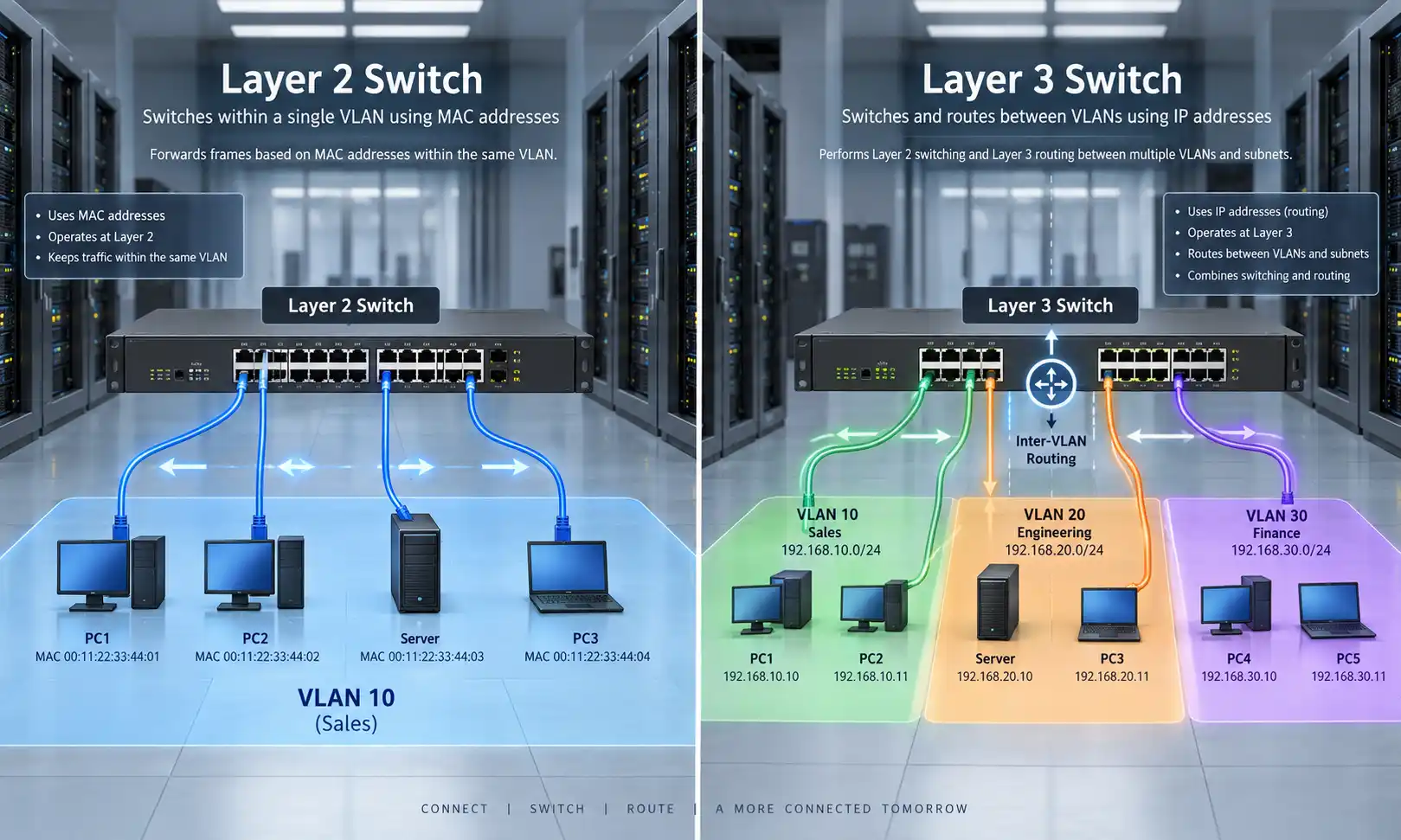
Layer 2 vs Layer 3 Switch
| Feature | Layer 2 Switch | Layer 3 Switch |
|---|---|---|
| Primary forwarding decision | MAC address | MAC address and IP address |
| Main role | Switch traffic inside a Layer 2 network or VLAN | Switch traffic and route between IP networks |
| MAC address table | Yes | Yes |
| IP routing table | Not used for normal Layer 2 forwarding | Yes |
| VLAN support | Yes on managed models | Yes |
| Inter-VLAN routing | Requires another Layer 3 device | Supported on routing-capable models |
| Typical deployment | Access switching | Distribution, core, or routed access |
| Routing features | None or limited on some L2+ models | Static and, depending on model, dynamic routing |
A useful rule is simple: use Layer 2 where you only need switching; use Layer 3 where the switch must also make routing decisions.
What a Layer 2 Switch Actually Does
A Layer 2 switch learns which MAC addresses are reachable through which physical ports and records that information in its MAC address table. When an Ethernet frame arrives, the switch examines the destination MAC address and forwards the frame toward the correct port whenever that destination is known.
This is the normal job of an access switch connecting computers, servers, IP phones, cameras, wireless access points, and other Ethernet devices. Depending on the deployment, those endpoints may use copper Ethernet through network cabling or connect upstream through fiber interfaces.
Layer 2 Switches Can Still Use VLANs
VLAN support does not by itself make a switch a Layer 3 switch. Managed Layer 2 switches can separate ports into different VLANs and carry several VLANs over an 802.1Q trunk.
The IEEE 802.1Q standard defines the operation of bridged networks and VLAN bridges. In practical Ethernet networks, 802.1Q tagging is commonly used to carry traffic for multiple VLANs between switches, routers, firewalls, and other VLAN-aware devices.
For example:
- VLAN 10: office users
- VLAN 20: application servers
- VLAN 30: IP cameras
A managed Layer 2 switch can keep those VLANs logically separate. The limitation appears when a device in one IP subnet needs to communicate with a device in another.
Why Different VLANs Need Layer 3 Routing
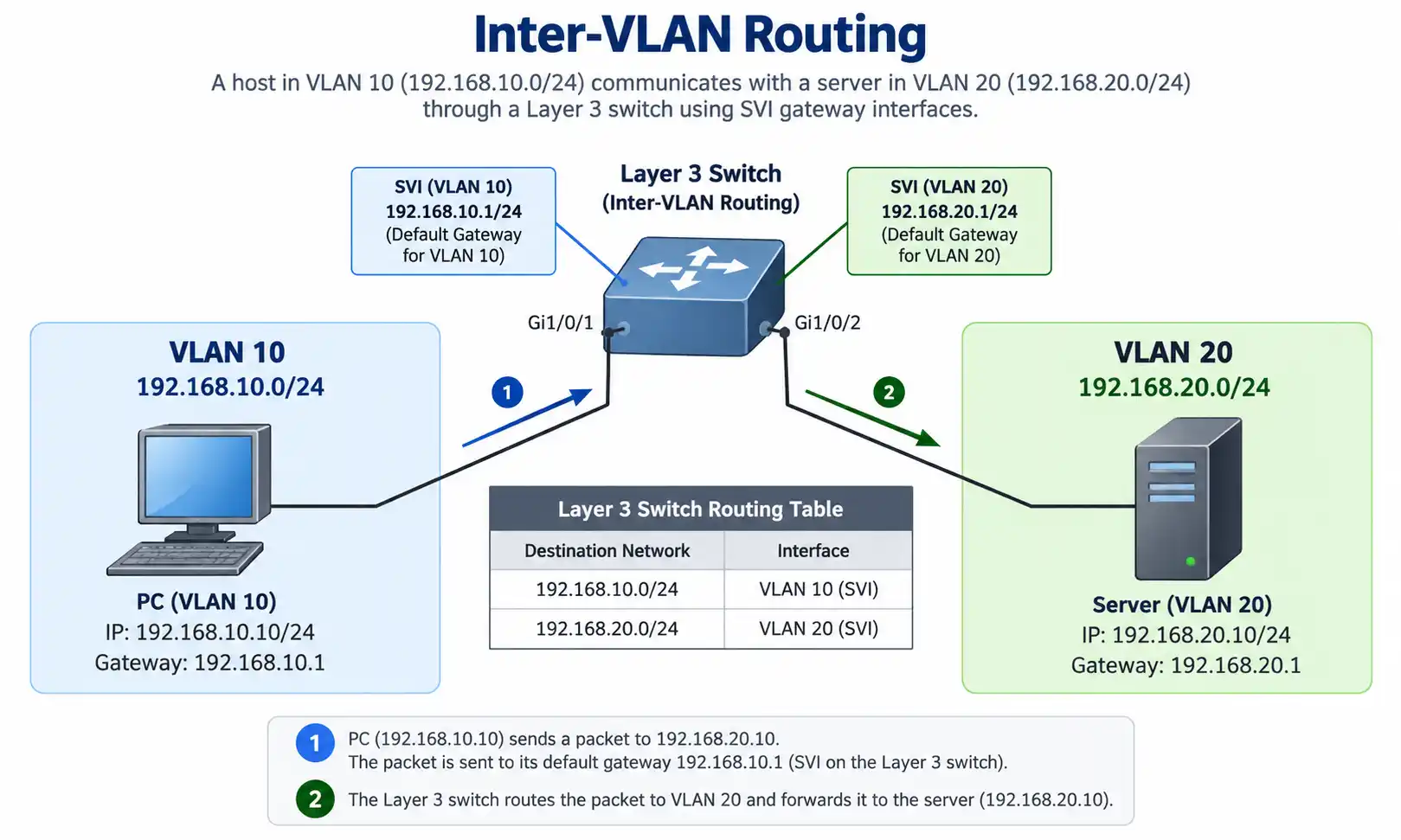
Consider two networks:
- VLAN 10: 192.168.10.0/24
- VLAN 20: 192.168.20.0/24
A host in VLAN 10 can communicate directly with other devices in the same subnet through Layer 2 switching. But a packet destined for 192.168.20.0/24 must be sent to a Layer 3 gateway because the destination is outside the local IP network.
That gateway can be a router, firewall, or Layer 3 switch. Cisco's Inter-VLAN Routing configuration documentation shows this model directly: Layer 2 switches carry the VLANs, while a routing-capable Catalyst switch uses VLAN interfaces to route between the corresponding subnets.
How an SVI Works as a VLAN Gateway
A common Layer 3 switch design uses switched virtual interfaces, or SVIs. Each routed VLAN can have a Layer 3 interface that serves as the default gateway for devices in that subnet.
VLAN 10 - Users
Subnet: 192.168.10.0/24
SVI / Gateway: 192.168.10.1

VLAN 20 - Servers
Subnet: 192.168.20.0/24
SVI / Gateway: 192.168.20.1
If a user at 192.168.10.25 sends traffic to a server at 192.168.20.50, the path can be:
User PC
→ 192.168.10.1 default gateway
→ Layer 3 routing table
→ VLAN 20
→ Server
The switch performs normal Layer 2 forwarding inside each VLAN, but it uses Layer 3 routing when traffic crosses the subnet boundary.
Some Layer 3 switches also support routed physical ports. In that case, an interface operates as an IP interface instead of a switchport assigned to a VLAN. Exact capabilities depend on the switch platform and software.
Layer 2 vs Layer 3 Switch: The Differences That Matter in a Real Network
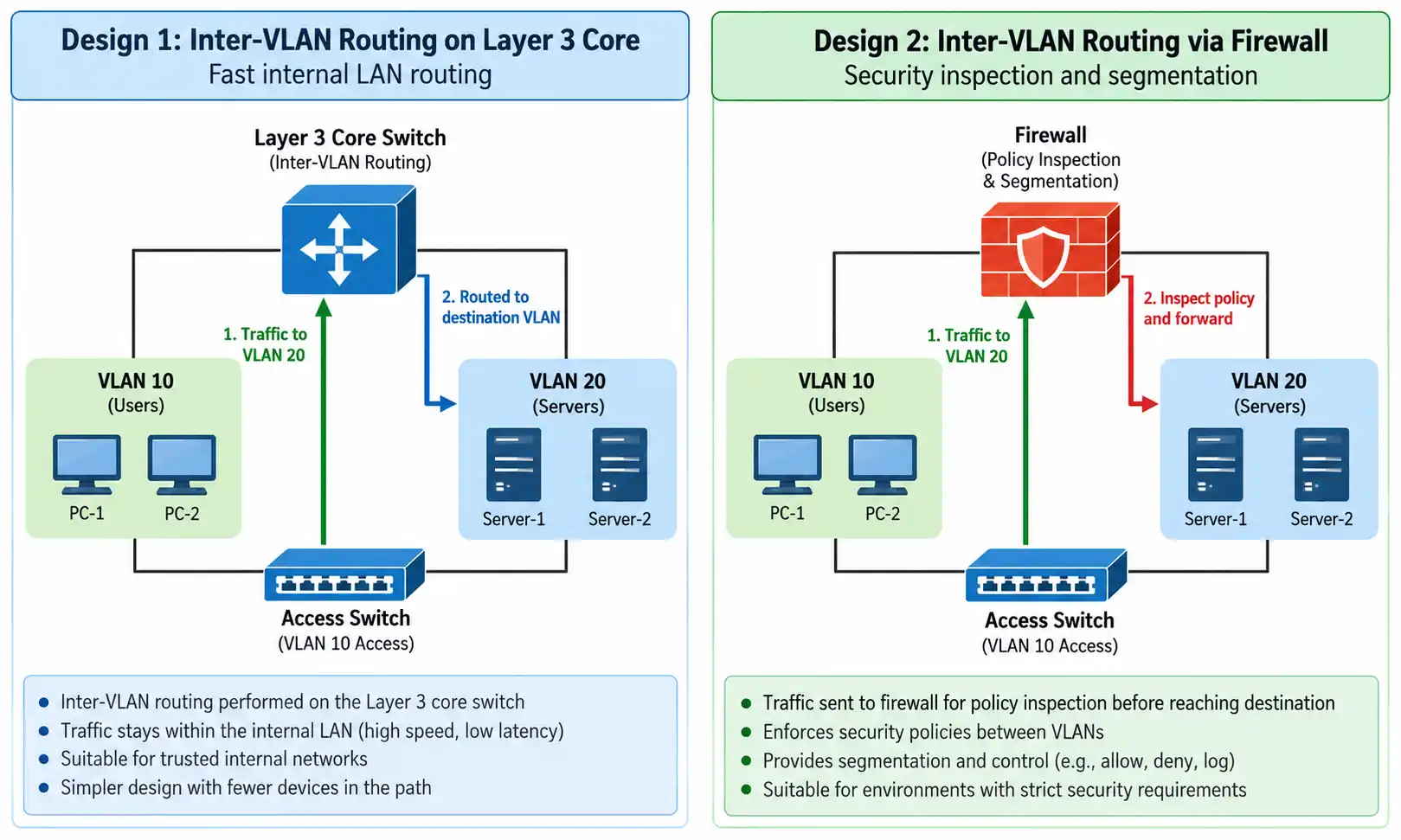
Forwarding Inside a VLAN vs Routing Between Subnets
Layer 2 switching is concerned primarily with forwarding Ethernet frames inside a Layer 2 domain. Layer 3 switching adds routing decisions based on destination IP networks.
This distinction matters more than the product label. A switch that supports VLAN creation but cannot route between those VLANs still relies on an external Layer 3 gateway for inter-subnet communication.
Access Layer vs Routing Boundary
Layer 2 switches are commonly used close to endpoints. Layer 3 switches are often placed where multiple access networks converge or where the network needs a local routing boundary.
These are design patterns, not hard rules. Routed-access architectures can bring Layer 3 closer to endpoints, while smaller networks may centralize all routing on a firewall.
Basic Routing vs Full Routing Feature Sets
Do not assume every product marked "Layer 3" provides the same routing functions. One switch may support only connected and static routes, while another may support IPv4 and IPv6 routing, OSPF, route redundancy, ACLs, and larger routing tables.
When OSPF is a requirement, verify that protocol support on the exact model and software release. OSPFv2 itself is defined by the IETF in RFC 2328, but implementation support varies by switch platform.
Should Inter-VLAN Routing Happen on a Layer 3 Switch or a Firewall?
This is one of the most important design questions, because performance and security inspection are not the same requirement.
Route on the Layer 3 Switch When Internal Traffic Should Stay in the LAN
If large amounts of trusted east-west traffic move between internal VLANs, placing the VLAN gateways on a Layer 3 switch can keep that traffic on the switching infrastructure.
A simplified path might be:
Access Switch
→ Layer 3 Core
→ Destination VLAN
This is common when user, server, storage, or application networks exchange substantial internal traffic and the switch is designed to provide the required routing capacity.
Route Through the Firewall When Inter-VLAN Inspection Is Required
If traffic between two VLANs must pass through stateful inspection, application policies, threat prevention, or another firewall control, keeping the VLAN gateways on the firewall may be the better design even if the path is less direct.
The path may look more like:
Access Switch
→ Firewall
→ Security Policy / Inspection
→ Destination VLAN
Moving those gateways onto a Layer 3 switch can change that security path. An ACL on a switch can restrict traffic, but it is not automatically equivalent to the inspection functions of a firewall.
For this reason, "we have many VLANs" is not enough information to decide where routing belongs. You also need to know which VLANs communicate, how much traffic crosses the boundary, and whether that traffic must be inspected.
When Is a Layer 2 Switch Enough?
A Layer 2 switch is often sufficient in the following situations:
- The network uses one main IP subnet.
- The switch is primarily an access device connecting endpoints.
- VLAN gateways are already configured on a router or firewall.
- Inter-VLAN traffic is modest and the existing gateway has enough capacity.
- Security policy requires VLAN-to-VLAN traffic to pass through a firewall.
For example, a small office may use separate employee, voice, and guest VLANs while the firewall provides the default gateways, DHCP services, Internet access, NAT, and policy enforcement. In that architecture, managed Layer 2 switches can still provide the VLAN connectivity the access layer needs.
When Does a Layer 3 Switch Make More Sense?
A Layer 3 switch becomes more useful when the LAN itself needs to make frequent routing decisions.
- Multiple VLANs exchange substantial internal traffic.
- The switch must serve as the default gateway for several subnets.
- Several access switches converge on a distribution or core layer.
- The design requires static or dynamic routing inside the LAN.
- The network needs a clearer Layer 3 boundary for scale or fault isolation.
In larger environments, high-speed switch uplinks may use optical interfaces rather than copper alone. The available fiber optic transceiver family, switch port type, supported reach, and fiber type should therefore be checked together rather than treating the switch as an isolated device.
Three Practical Network Designs
1. Small Office: Layer 2 Access with Firewall Routing
Internet
   |
Firewall
   |
Managed Layer 2 Switch
 |        |        |
Users   Phones   Access Points
This design is reasonable when the firewall already handles the VLAN gateways and the expected inter-VLAN load fits within its interfaces and inspection capacity.
2. Business LAN: Layer 2 Access with Layer 3 Core
             Firewall
                |
          Layer 3 Switch
          /      |      \
       L2 SW   L2 SW   L2 SW
        |        |       |
      Users    Servers  Devices
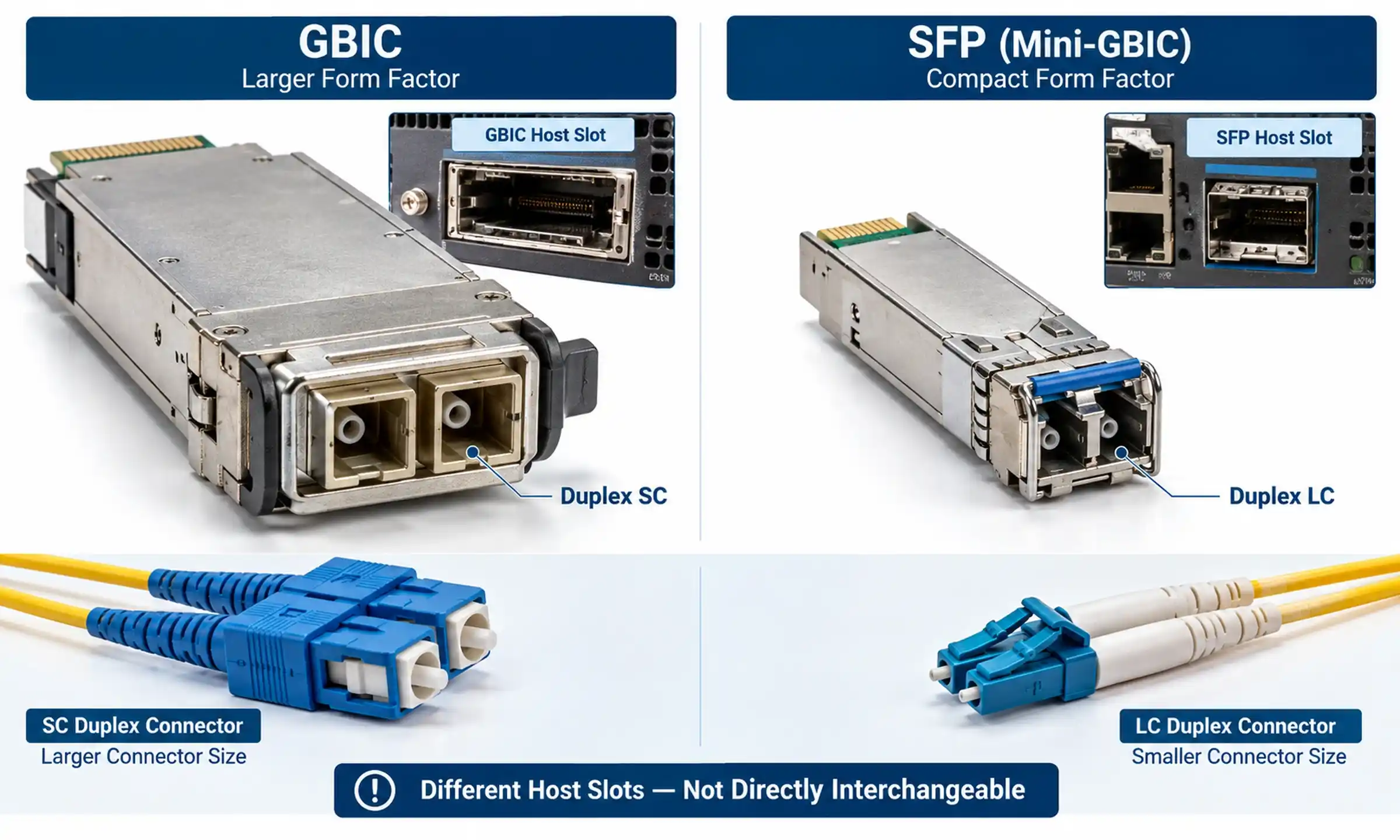
Here the Layer 3 switch can provide local routing for trusted internal networks, while the firewall remains responsible for Internet access and security functions. Fiber uplinks between switches may use SFP transceivers or higher-speed optical modules depending on port speed and distance.
3. Higher-Capacity Aggregation or Campus Network
As access switches, users, wireless systems, cameras, and server networks grow, uplink design becomes as important as the Layer 2/Layer 3 decision itself.
A distribution or core switch may require redundant fiber links, link aggregation, gateway redundancy, and higher-speed interfaces. For 40G uplinks, the switch and cabling design may use 40G QSFP transceivers; 100G designs may instead use 100G QSFP28 transceivers. The optical module, fiber type, connector interface, reach, and switch compatibility must all match.
Parallel-optics designs can also require high-density MPO/MTP cable assemblies, so physical-layer planning should be completed alongside switch selection rather than after it.

What About Layer 2+ or Layer 3 Lite Switches?
Terms such as "Layer 2+" and "Layer 3 Lite" are vendor-dependent. They often describe switches that provide more than basic Layer 2 switching but do not expose the same routing feature set as a full Layer 3 platform.
A product might support VLANs and static routes while lacking a routing protocol or gateway-redundancy feature required by the design.
Before purchasing, check the actual specification for:
- IPv4 and IPv6 routing
- Static and default routes
- SVI support
- Routed physical interfaces
- Routing table capacity
- ACL capability
- Gateway redundancy
- Dynamic routing protocols, if required
The feature table matters more than the marketing label.
How to Choose Between a Layer 2 and Layer 3 Switch
1. Decide Where Each VLAN Gateway Will Live
List the VLANs and identify which device should be their default gateway: router, firewall, or Layer 3 switch. This single step often resolves most of the Layer 2 vs Layer 3 decision.
2. Map the Traffic Between VLANs
Identify which networks actually communicate with each other. A network in which almost all traffic goes to the Internet has different routing needs from one in which servers, applications, storage, and users exchange large amounts of east-west traffic.
3. Decide Which Traffic Requires Security Inspection
If a VLAN boundary is also a security boundary, determine whether the traffic needs firewall inspection rather than simple routed forwarding or ACL filtering.
4. Verify the Routing Features You Need
Check the actual switch model for static routing, IPv6, SVI support, routed ports, ACLs, route redundancy, and any dynamic protocol required by the design. Do not buy on the words "Layer 3" alone.
5. Check Switching and Uplink Capacity
For higher-throughput networks, compare switching capacity, forwarding rate, access-port speeds, uplink speeds, and expected oversubscription. An L3 feature set does not compensate for undersized uplinks.
6. Match the Switch to the Physical Network
Confirm whether each uplink is copper or fiber, the optical form factor supported by the switch, and the required distance. A complete design has to align the switch interface, transceiver, fiber, and connector system.
Common Layer 2 vs Layer 3 Switch Mistakes
Assuming VLAN Support Means Layer 3 Routing
A managed Layer 2 switch can create and transport VLANs. The important question is whether it can route between the corresponding IP subnets.
Buying Layer 3 Everywhere Without a Routing Plan
Adding routing capability to every access switch does not automatically improve a network. First decide where routing boundaries belong and how routes will be controlled.
Moving Gateways Off the Firewall Without Reviewing Security
If the firewall currently inspects traffic between VLANs, moving the default gateways onto an L3 switch can alter or bypass that inspection path unless the architecture is redesigned accordingly.
Assuming Every Layer 3 Switch Supports the Same Protocols
Basic static routing and a full enterprise routing feature set are not the same thing. Verify support on the exact hardware and software release.
Ignoring the Uplink
A switch with many fast access ports can still become constrained by a slow or oversubscribed uplink. Evaluate the end-to-end traffic path, not just the access-port count.
Layer 2 or Layer 3: The Final Decision
Choose a Layer 2 switch when the device mainly needs to connect endpoints, separate traffic into VLANs, and forward those VLANs to another router, firewall, or Layer 3 switch.
Choose a Layer 3 switch when the switch itself needs to act as the gateway between subnets, route substantial internal traffic, or participate in a larger routed LAN design.
In many business networks, both are used together: Layer 2 switches provide endpoint access, Layer 3 switches provide selected internal routing, and a router or firewall handles Internet, WAN, and security services. The deciding factor is not the layer number alone; it is the traffic path and the role each device must perform.
Frequently Asked Questions
Can a Layer 2 switch have an IP address?
Yes. A managed Layer 2 switch can have an IP address for management. That management address does not automatically mean the switch can route user traffic between different IP subnets.
Do I need a Layer 3 switch to use VLANs?
No. Managed Layer 2 switches can create and carry VLANs. A Layer 3 device is required when traffic needs to move between the IP networks associated with those VLANs.
Can a Layer 3 switch act as the default gateway?
Yes, if the switch supports the required Layer 3 interfaces and routing configuration. An SVI is commonly used as the default gateway for hosts in a VLAN.
Does a Layer 3 switch still need a router or firewall?
Often, yes. A Layer 3 switch can perform internal routing, but Internet connectivity, NAT, VPN, WAN functions, and stateful security may still belong on a router or firewall depending on the network design.
Which is better for a small business: Layer 2 or Layer 3?
If a capable firewall already provides the VLAN gateways and there is limited internal cross-VLAN traffic, managed Layer 2 access switches may be sufficient. A Layer 3 switch becomes more useful as internal routing demand, VLAN count, or network scale increases.
What is a Layer 2+ switch?
Layer 2+ is not a universally fixed feature level. It commonly refers to a managed switch that adds limited Layer 3 functions such as static routing. Always verify the exact feature list instead of relying on the label.