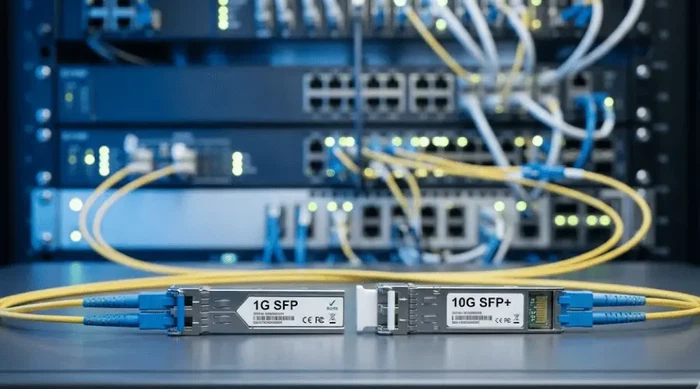
If you are comparing an SFP transceiver with an SFP+ transceiver, the core difference is line rate: SFP is the standard pluggable module for 1 Gigabit Ethernet links, and SFP+ is its enhanced successor built for 10 Gigabit Ethernet. Both share the same 20-pin form factor defined by the SFF Committee multi-source agreements, which is exactly why they look identical on the shelf - and why compatibility questions cause so many procurement mistakes.
This guide covers the technical differences between 1G SFP and 10G SFP+ modules, explains when cross-insertion actually works (and when it does not), and walks through the verification steps that prevent mismatched optics from stalling a deployment.
SFP vs SFP+ at a Glance
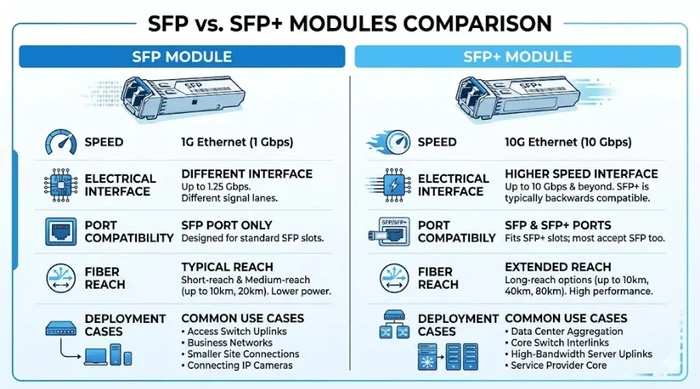
| Feature | SFP (1G) | SFP+ (10G) |
|---|---|---|
| Ethernet data rate | 1 Gbps (1000BASE-SX, LX, ZX, BX, T) | 10 Gbps (10GBASE-SR, LR, ER, ZR, T) |
| Electrical interface | SFP MSA - lower-speed SerDes | SFP+ MSA (SFF-8431) - 10 Gb/s high-speed SerDes |
| Typical reach (single-mode fiber) | 10 km–120 km depending on variant | 10 km–80 km depending on variant |
| Typical reach (multimode fiber) | Up to 550 m (850 nm SX) | Up to 300 m (850 nm SR) on OM3; 400 m on OM4 |
| Copper option | 1000BASE-T (RJ45, up to 100 m) | 10GBASE-T (RJ45, up to 30 m); SFP+ DAC (up to ~7 m) |
| SFP-in-SFP+ port | Possible if host firmware enables 1G negotiation on that port | |
| SFP+-in-SFP port | Not supported - 10G SerDes exceeds SFP port electrical spec | |
| Common deployment | Access switches, branch uplinks, legacy interconnects | Aggregation uplinks, server NICs, storage, inter-switch links |
What Is an SFP Module?
SFP stands for Small Form-factor Pluggable. The original SFP multi-source agreement (MSA) defines a hot-swappable transceiver cage designed for Gigabit-class data rates. In Ethernet networks, SFP modules carry 1000BASE traffic - whether over single-mode fiber, multimode fiber, or copper RJ45.
Even as 10G and 25G adoption grows, 1G SFP modules remain heavily deployed. They are the practical choice for access-layer switch ports, low-bandwidth uplinks between floors or buildings, and any link where 1 Gbps throughput is sufficient and cost control matters. Cisco's Gigabit Ethernet SFP documentation lists dozens of 1G SFP variants still in active production, which confirms that the form factor is far from obsolete.
What Is an SFP+ Module?
SFP+ stands for Enhanced Small Form-factor Pluggable. The SFP+ MSA (specified in SFF-8431 and SFF-8432) raises the electrical interface speed to 10 Gb/s while keeping the same physical cage dimensions as SFP. This means SFP+ modules fit the same slot outline, but the host port must implement a higher-speed SerDes to drive the 10G signal.
In practice, SFP+ is the default choice whenever a network requires 10 Gigabit Ethernet connectivity - 10GBASE-SR for short multimode runs, 10GBASE-LR for campus or metro single-mode links, or 10GBASE-ZR for long-haul 80 km reaches. It is also used for 10G Fibre Channel in SAN environments and for 10G BiDi single-fiber links in campus rings.
Key Differences Between SFP and SFP+
Line Rate: 1G vs 10G
The headline difference is bandwidth. SFP modules operate at 1.25 Gb/s line rate (carrying 1 Gbps Ethernet payload), while SFP+ modules operate at 10.3125 Gb/s. That is not a small gap - it is a full order of magnitude, and it affects every layer of the link budget: laser modulation rate, receiver sensitivity, and the dispersion tolerance of the fiber path.
If your current traffic profile peaks below 500 Mbps on a given uplink, a 1G SFP link may be entirely adequate. But if you are aggregating traffic from 48-port gigabit access switches, connecting virtualization hosts with multiple VMs generating east-west traffic, or linking an iSCSI storage array, a 10G SFP+ uplink is usually the minimum practical choice.
SFP Port vs SFP+ Port Compatibility
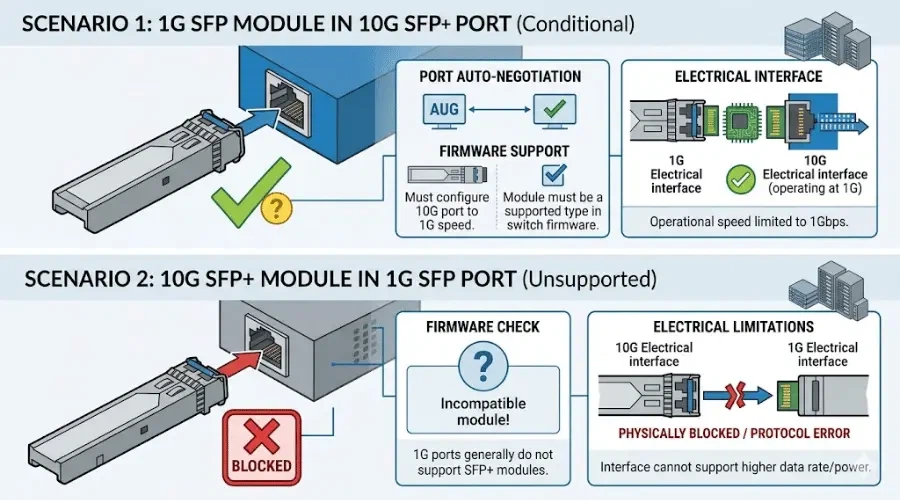
This is where the most expensive mistakes happen. Because the two module types share a physical form factor, engineers sometimes assume they are freely interchangeable. They are not - and the reason is electrical, not mechanical.
An SFP+ port implements a 10 Gb/s high-speed serial interface. Some switch platforms - Cisco Catalyst 9300, Arista 7050 series, Juniper EX4300, among others - allow their SFP+ ports to auto-negotiate down to 1G when a 1G SFP module is detected. This is a firmware-level feature, not a physical certainty. Other platforms, particularly older or lower-cost models, may reject the SFP module entirely or throw a media-type mismatch error.
Going the other direction is worse: inserting a 10G SFP+ module into a 1G SFP-only port will not work. The SFP port's electrical interface cannot drive or receive a 10 Gb/s signal. The module may physically fit, but the link will never come up.
The verification rule is simple: before purchasing optics, check the host device's hardware compatibility matrix - not just the slot shape. Cisco publishes per-platform transceiver compatibility matrices, and Juniper and Arista maintain similar lists. If the matrix does not explicitly list 1G SFP support on an SFP+ port for your specific switch model and firmware version, do not assume it will work.
Fiber Type, Connector, and Reach
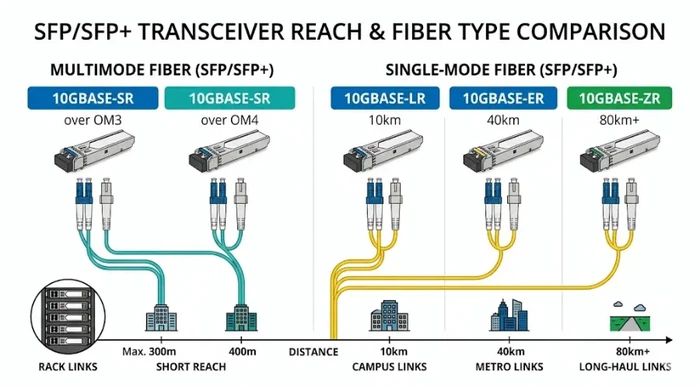
Both SFP and SFP+ families include variants for different media types and distances. Choosing the right transceiver family is only the first step - you also need to match the optic to the fiber plant you already have installed.
A 10GBASE-SR SFP+ module is designed for 850 nm multimode fiber and typically reaches 300 m on OM3 fiber or 400 m on OM4 fiber. A 10GBASE-LR module uses 1310 nm on single-mode fiber for up to 10 km. If you need to span 40 km or 80 km, you are looking at ER or ZR variants with corresponding optical power budgets. The same logic applies to 1G SFP: a 1000BASE-SX module on multimode reaches about 550 m, while a 1000BASE-ZX module on single-mode can reach 80 km.
In all cases, both ends of the link must use compatible optics and matching fiber connectors - typically LC duplex for both SFP and SFP+. If you are connecting to an adapter panel in a patch rack, confirm that the adapter type matches before ordering modules.
Copper SFP and SFP+ Options
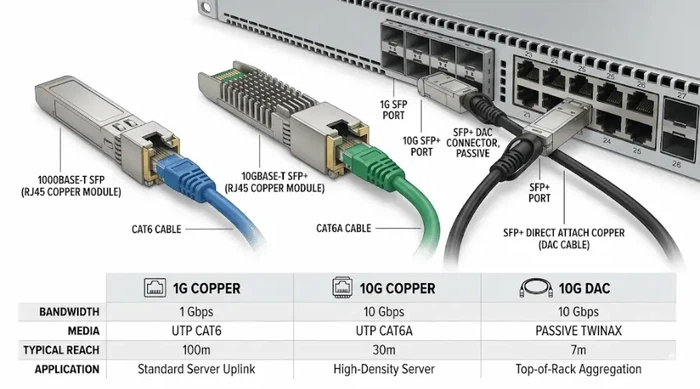
Not every SFP or SFP+ deployment involves fiber. The 1000BASE-T SFP module provides a copper RJ45 port for 1G Ethernet over Cat5e/Cat6 cabling up to 100 m. On the 10G side, 10GBASE-T SFP+ modules exist but typically reach only 30 m and draw noticeably more power - a consideration in dense switch chassis. For very short distances (within a rack or between adjacent racks), SFP+ direct-attach copper (DAC) cables offer a lower-cost, lower-latency alternative to optical transceivers.
Can You Use an SFP Module in an SFP+ Port?
Often yes - but only under specific conditions. Here is what actually determines whether this works:
- Platform support: The switch or router must explicitly support 1G SFP operation on its SFP+ ports. This is a per-model, per-firmware capability. For example, Cisco documents 1G SFP support on many Nexus and Catalyst SFP+ ports, but not on all line cards or all software versions.
- Speed negotiation: The port must be able to auto-negotiate or be manually configured to 1G. On some platforms you may need to enter speed 1000 in the interface configuration.
- DOM and coding: Some hosts check the module's EEPROM identifier byte. If the module identifies as SFP (not SFP+), a strict host may refuse it unless 1G compatibility mode is enabled.
The practical takeaway: if you are migrating a network from 1G to 10G in phases, inserting existing 1G SFP modules into new SFP+ switches can work during the transition - but verify per-port support before deploying.
Can You Use an SFP+ Module in an SFP Port?
No. The SFP+ electrical specification (SFF-8431) defines a 10 Gb/s high-speed interface that an SFP-only host port cannot drive. The module will physically seat in the cage, but the link will not establish. This is not a configuration issue or a firmware gap - it is a hardware limitation of the SFP port's SerDes circuitry.
The compatibility relationship is one-directional: some SFP+ ports can step down to 1G for SFP modules, but SFP ports cannot step up to 10G for SFP+ modules.
How to Choose Between SFP and SFP+
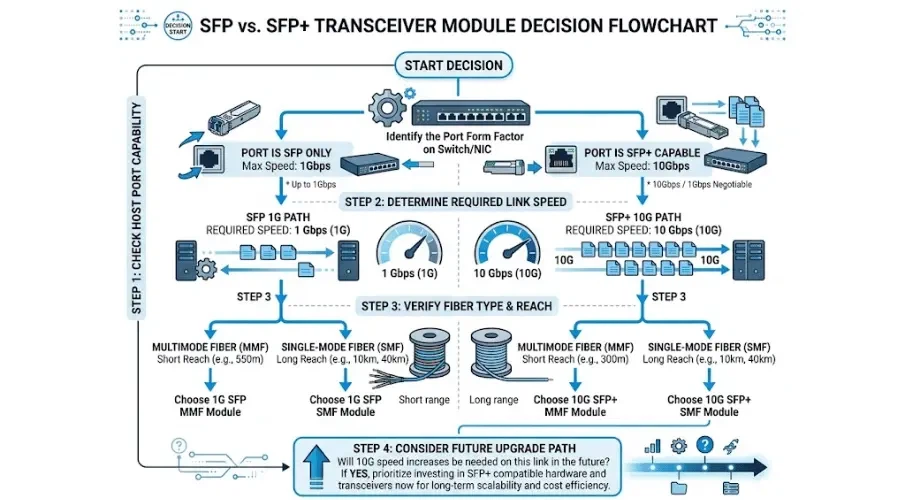
Selecting the right module is not a standalone optics decision - it is part of a link-level design that involves host capability, fiber infrastructure, and traffic requirements. Here is a practical four-step verification sequence that we use when reviewing transceiver fit for deployment projects:
Step 1: Confirm Host Port Capability
Check the switch, router, or NIC datasheet for the exact port type. Look for statements like "SFP+ ports supporting 1G/10G" versus "SFP+ ports, 10G only." If you are working with used or refurbished equipment, also verify the running firmware version - older firmware may not support dual-rate operation even if the hardware does.
Step 2: Determine Required Link Speed
Match the transceiver to your actual throughput need. Overprovisioning to 10G on a link that will never exceed 200 Mbps wastes budget. Underprovisioning to 1G on a server uplink that regularly saturates at 950 Mbps creates a bottleneck you will have to revisit within months. Measure or estimate peak utilization before deciding.
Step 3: Verify Fiber Type and Reach
Identify the installed fiber cable type (single-mode OS2, multimode OM3/OM4), the connector end-face polish (UPC or APC), and the link distance. Then pick the transceiver variant that fits. For instance, if you have an existing OM3 multimode backbone between two buildings 200 m apart, a 10GBASE-SR SFP+ module is the right fit. If the span is 8 km on single-mode, 10GBASE-LR is the match. If the optical budget is tight on a long span, you may need an optical attenuator at the receive end to avoid overloading the detector on short links, or you may need a higher-power ZR optic for extended reach.
Step 4: Factor in Upgrade Horizon
If you are buying new switches with SFP+ ports and your current traffic only needs 1G, it still makes sense to buy SFP+ capable infrastructure. You can run 1G SFP modules now (if the host supports it) and upgrade to 10G SFP+ modules later - without replacing the switch. This is a common phased approach in campus network refreshes and is one of the strongest practical reasons to choose SFP+ capable hardware even when current bandwidth requirements are modest.
Common Mistakes When Choosing SFP or SFP+ Modules
Judging compatibility by physical fit. The most common and costly error. The module clicks into the cage, so the engineer assumes it will work. It may not. Always confirm through the vendor's compatibility matrix, not the cage dimensions.
Ignoring fiber type mismatch. Inserting a single-mode optic (1310 nm or 1550 nm) into a multimode fiber plant, or vice versa, will either produce no link or an unreliable link with high error rates. This matters especially in buildings with mixed fiber runs - OM1 legacy closets alongside OS2 backbone, for example.
Assuming all 10G links need fiber. For intra-rack connections under 5 m, an SFP+ DAC cable is cheaper, lower-latency, and simpler than a pair of optical transceivers plus a fiber patch cord. Do not default to optics when copper direct-attach is the better tool for the job.
Overlooking DOM support. Digital Optical Monitoring (DOM) lets the switch report real-time Tx power, Rx power, temperature, and bias current from the transceiver. Some third-party SFP/SFP+ modules disable or limit DOM, which removes your visibility into link health. If you rely on monitoring, confirm DOM is supported and functional on the specific module and platform combination.
SFP vs SFP+ in Real Deployment Scenarios
Branch Office Access Switch Uplink
A branch office with 20 users and a 100 Mbps WAN circuit does not need 10G internal uplinks. A 1000BASE-LX SFP module on single-mode fiber connecting the branch access switch to a distribution router is cost-effective and fully adequate. Upgrading to SFP+ here would add cost with no operational benefit.
Data Center Server Connectivity
A virtualization host running 30 VMs with aggregate internal traffic exceeding 4 Gbps needs 10G SFP+ NIC uplinks. In high-density environments with MTP/MPO cabling between leaf and spine switches, 10G SFP+ is the baseline - and many organizations are already moving to 25G SFP28 for server-facing ports.
Campus Backbone Upgrade
A university campus with a 1G fiber backbone experiencing congestion during peak lecture hours is a textbook case for upgrading to 10G SFP+ on the existing single-mode fiber plant. If the backbone switches have SFP+ ports, the upgrade requires only new 10GBASE-LR transceiver modules - no fiber re-cabling, no switch replacement.
Beyond SFP+: Where Does 10G Fit in the Bigger Picture?
SFP+ is not the only 10G form factor. XFP modules were an earlier 10G standard with a larger physical footprint and higher power consumption; they are still found in some DWDM and telecom platforms but have largely been displaced by SFP+ in enterprise Ethernet. For 40G, the industry moved to QSFP+ modules; for 100G, to QSFP28 modules. The progression from SFP to SFP+ to SFP28 (25G) follows the same MSA form factor, meaning SFP28 ports on newer switches can often accept both SFP+ (10G) and SFP (1G) modules - the same conditional backward-compatibility logic applies.
Conclusion
The difference between SFP and SFP+ is fundamentally about line rate - 1G versus 10G - built on top of the same physical form factor. The compatibility relationship is asymmetric: some SFP+ ports support 1G SFP modules, but no SFP port supports 10G SFP+ modules. Every purchasing decision should start with the host device compatibility matrix, then move to fiber type and reach, and finally consider the upgrade path.
If you are planning a transceiver purchase, start by pulling the compatibility list for your specific switch model and firmware. Match the optic to your installed cabling, confirm DOM support if you need monitoring, and choose the module that fits your real throughput requirement - not the one that sounds faster on paper.
Frequently Asked Questions
Is SFP the same as SFP+?
No. Both are pluggable transceiver form factors that share the same physical cage, but SFP operates at 1 Gbps and SFP+ operates at 10 Gbps. The electrical interface specifications differ - SFP+ requires a 10 Gb/s SerDes defined in SFF-8431 - which is why they are not universally interchangeable.
Can I use a 1G SFP module in a 10G SFP+ port?
On many platforms, yes - if the host device explicitly supports 1G operation on that SFP+ port. Check the switch vendor's transceiver compatibility matrix for your exact model and firmware version. Do not rely on physical fit as proof of compatibility.
Can I use a 10G SFP+ module in a 1G SFP port?
No. The SFP port hardware cannot support the 10 Gb/s electrical interface. The module will physically insert but the link will not come up.
Is SFP+ fiber only, or does it support copper?
SFP+ supports both fiber and copper. Fiber variants include 10GBASE-SR (multimode), 10GBASE-LR and 10GBASE-ER (single-mode). Copper options include 10GBASE-T RJ45 modules (typically up to 30 m) and SFP+ direct-attach copper cables for short intra-rack connections.
Which should I choose for future upgrades - SFP or SFP+?
If your network roadmap includes any path toward higher throughput, buy switches with SFP+ (or SFP28) ports. You can run 1G SFP modules now and swap to 10G SFP+ later without replacing infrastructure. If your environment will remain at 1G indefinitely and budget is the primary constraint, SFP-only equipment is still a practical option.
What is the difference between SFP+ and SFP28?
SFP28 is the next step up - it uses the same form factor but supports 25 Gbps line rate. SFP28 ports typically accept both SFP+ (10G) and SFP (1G) modules with the same conditional backward-compatibility rules: check your host device documentation before assuming it works.