1000BASE-SX, 1000BASE-LX, 1000BASE-EX, 1000BASE-ZX and 1000BASE-BX are all Gigabit Ethernet fiber optic module terms, but they are not the same type of link. They differ in fiber type, wavelength, connector format, transmission distance, optical power budget and deployment risk.
For most users, the real question is not only "What does this name mean?" but "Which 1G SFP module should I install on this fiber route?" This guide explains the common 1000BASE SFP types, compares their practical differences, and shows how to choose the right module for multimode fiber, single mode fiber, long-distance links and single-fiber BiDi connections.
If you are comparing module options for a project, FOCC provides fiber optic transceivers, SFP transceivers and 1000BASE SFP module transceivers for common Gigabit Ethernet fiber links.

Which 1000BASE SFP Should You Choose?
| Network Requirement | Recommended Starting Point | Main Check Before Buying |
|---|---|---|
| Short multimode link inside a data center or equipment room | 1000BASE-SX | Confirm OM1, OM2, OM3 or OM4 fiber grade and link distance |
| Standard single mode link up to about 10km | 1000BASE-LX | Check OS1/OS2 fiber, LC duplex patching and switch compatibility |
| Single mode link around 20km to 40km | 1000BASE-LH or 1000BASE-EX | Compare optical budget, receiver sensitivity and vendor naming |
| Long single mode route around 70km to 80km | 1000BASE-ZX | Check route loss, receiver overload and possible attenuator requirement |
| Ultra-long single mode route around 100km or 120km | 1000BASE-EZX or vendor-defined ultra-long-reach SFP | Verify datasheet, dispersion, link margin and received optical power |
| Only one fiber strand is available | 1000BASE-BX | Buy matched A/B or U/D BiDi wavelength pairs |
| Multiple wavelengths must share limited fiber | CWDM or DWDM SFP | Match wavelength channel, mux/demux port and insertion loss |

Standards and Naming Notes: IEEE Terms vs Vendor Terms
Before comparing modules, it is important to separate formal Ethernet standards from common vendor naming. The IEEE 802.3 Ethernet Working Group is the main standards body for Ethernet. 1000BASE-SX and 1000BASE-LX are associated with IEEE 802.3z Gigabit Ethernet optical interfaces. 1000BASE-BX is related to single-fiber Ethernet access work under the IEEE P802.3ah Ethernet in the First Mile project.
Terms such as 1000BASE-LH, 1000BASE-EX, 1000BASE-ZX and 1000BASE-EZX are commonly used in the industry, but their exact reach and optical specifications can vary by vendor. For these modules, the product name is not enough. Always check the datasheet for wavelength, transmit power, receiver sensitivity, receiver overload, operating temperature and compatibility coding.

What Is 1000BASE-SX? Distance, Wavelength and Applications
1000BASE-SX is a short-reach Gigabit Ethernet optical interface for multimode fiber. It typically uses an 850nm wavelength and is commonly installed with OM1, OM2, OM3 or OM4 multimode fiber. It is usually selected for links inside data centers, equipment rooms, office buildings and short enterprise LAN routes.
Use 1000BASE-SX when the installed fiber is multimode and the required distance is within the supported range of that fiber grade. Older OM1 and OM2 fiber normally support shorter distances than laser-optimized OM3 and OM4 fiber. For short 1G multimode links, FOCC's OM3 multimode patch cords and OM4 multimode patch cords are typical cabling options.
Best For
- Short data center links
- Switch-to-switch links inside the same room
- Enterprise LAN uplinks over multimode fiber
- Low-cost 1G fiber connections where distance is limited
Avoid When
- The installed cable is single mode fiber
- The route needs to reach several kilometers
- The link is between buildings over OS2 fiber
What Is 1000BASE-LX? Single Mode Reach and Use Cases
1000BASE-LX is a long-wavelength Gigabit Ethernet optical interface. It typically uses a 1310nm wavelength and is mainly used with single mode fiber. A common 1000BASE-LX SFP is selected for single mode links up to about 10km, although some vendor versions may support longer distances.
For single mode patching, OS1 or OS2 fiber is normally used. In many enterprise and campus networks, OS2 9/125 singlemode patch cords are paired with 1000BASE-LX, EX, ZX or BX modules.

1000BASE-LX can sometimes operate over multimode fiber, but this should not be treated as a default design choice. Cisco's documentation on mode conditioning patch cables explains that 1000BASE-LX/LH transmission over legacy multimode fiber may require mode conditioning, and that the requirement depends on fiber type and application.
Best For
- Building-to-building links up to about 10km
- Campus backbone links over single mode fiber
- Enterprise aggregation uplinks
- Standard 1G single mode deployments
Avoid When
- The link is a very short multimode route better served by SX
- The route is far beyond the module's rated optical budget
- The multimode cable plant is unknown and no mode conditioning plan exists
What Is 1000BASE-LH?
1000BASE-LH is commonly used by vendors to describe long-haul Gigabit Ethernet fiber modules, often around 20km or 40km over single mode fiber. It is not always used consistently across manufacturers. In one catalog, LH may mean a 20km 1310nm module; in another, it may overlap with EX-type reach.
When comparing 1000BASE-LH with 1000BASE-LX or 1000BASE-EX, do not rely on the name alone. Check the optical power budget, minimum transmit power, receiver sensitivity and receiver maximum input power. For deployment, also confirm LC connector type, patch panel path and the quality of the installed single mode route.
What Is 1000BASE-EX?
1000BASE-EX usually refers to an extended-reach 1G SFP module for single mode fiber, often around 40km. Many EX modules use a 1310nm wavelength and provide a higher optical power budget than standard LX modules.
EX is a practical starting point when the route is too long for LX but does not need a ZX-class 70km or 80km optic. For example, a campus or metro access link around 30km to 40km may be a better match for EX than for LX, provided that the calculated route loss stays within the module's optical budget.

Best For
- Extended campus backbone links
- Metro access links around 40km
- Longer enterprise single mode routes
- Industrial or utility fiber routes where LX is not enough
Key Risk
EX modules may transmit at higher optical power than LX modules. If the route is very short, check whether the received power will exceed the receiver's maximum input level.
What Is 1000BASE-ZX?
1000BASE-ZX is a long-reach Gigabit Ethernet SFP type commonly associated with 70km or 80km single mode links. It usually operates around 1550nm. A 1550nm link can be useful for longer routes because single mode fiber often has lower attenuation near 1550nm than near 1310nm. For example, Corning's SMF-28 Ultra optical fiber specifications list lower maximum attenuation at 1550nm than at 1310nm.
ZX should not be selected only because "longer is better." Long-reach modules can create receiver overload on short fiber routes. If the expected received power is too high, use a suitable fiber optic attenuator or select a shorter-reach module.
Best For
- Long campus backbone links
- Remote site interconnection
- Metro network extensions
- Long single mode routes where LX or EX does not provide enough reach
What Is 1000BASE-EZX?
1000BASE-EZX is a vendor-defined term often used for ultra-long-reach 1G SFP modules, such as 100km or 120km single mode optics. Some suppliers may call similar modules ZX100, ZX120 or EZX. These names should always be verified against the datasheet.
EZX modules need stricter planning than SX, LX or EX modules. The fiber route loss, connector count, splice loss, patch panel loss, dispersion limits and receiver overload level all matter. If the actual route is much shorter than the module rating, attenuation may be required to protect the receiver.
What Is 1000BASE-BX? Single-Fiber BiDi SFP Explained
1000BASE-BX is a bidirectional Gigabit Ethernet SFP type designed to transmit and receive over one strand of single mode fiber. Unlike standard duplex modules, which use one fiber for transmit and one fiber for receive, BX modules use two different wavelengths on the same fiber strand.
A BX link must use matched pairs. If one side transmits at 1310nm and receives at 1550nm, the opposite side must transmit at 1550nm and receive at 1310nm. Buying two identical BX modules is a common cause of a link that never comes up.
Common BX Pairing Logic
| e A | Side B | Result |
|---|---|---|
| TX 1310nm / RX 1550nm | TX 1550nm / RX 1310nm | Correct matched pair |
| TX 1310nm / RX 1490nm | TX 1490nm / RX 1310nm | Correct matched pair |
| TX 1310nm / RX 1550nm | TX 1310nm / RX 1550nm | Wrong pair; link will fail |
BX is useful when fiber resources are limited, such as FTTx access, building links with only one available strand, and carrier or enterprise routes where adding another fiber is difficult.
1000BASE-SX vs LX vs LH vs EX vs ZX vs EZX vs BX
| 1000BASE-SX | 850nm | Multimode fiber | Duplex LC | Short reach, depending on MMF grade | Data center and LAN links | Wrong choice for long single mode routes |
| 1000BASE-LX | 1310nm | Single mode fiber; sometimes MMF with conditions | Duplex LC | About 10km, vendor versions may vary | Standard campus or building links | MMF use may require mode conditioning |
| 1000BASE-LH | Usually 1310nm | Single mode fiber | Duplex LC | Often 20km or 40km | Long-haul enterprise links | Vendor naming is inconsistent |
| 1000BASE-EX | Usually 1310nm | Single mode fiber | Duplex LC | Often around 40km | Extended campus and metro links | Higher power may overload short links |
| 1000BASE-ZX | Usually 1550nm | Single mode fiber | Duplex LC | Often around 70km or 80km | Long-distance backbone links | Needs link budget and overload check |
| 1000BASE-EZX | Usually 1550nm | Single mode fiber | Duplex LC | Often around 100km or 120km | Ultra-long single mode routes | Requires careful budget, margin and attenuation planning |
| 1000BASE-BX | Paired wavelengths such as 1310/1490nm or 1310/1550nm | Single mode fiber | Simplex LC | 10km to 120km, depending on model | Single-fiber BiDi links | Wrong A/B pair will prevent link-up |
1000BASE-SX vs 1000BASE-LX: Key Differences
Fiber Type
1000BASE-SX is designed for multimode fiber. 1000BASE-LX is mainly designed for single mode fiber. If the route uses legacy multimode fiber, check whether OM1 multimode patch cords or OM2 multimode patch cords are present before selecting an LX module over MMF.
Wavelength
1000BASE-SX typically uses 850nm. 1000BASE-LX typically uses 1310nm. This wavelength difference is one reason SX is associated with short multimode links, while LX is associated with longer single mode links.
Transmission Distance
SX is normally used for short links inside rooms, cabinets or buildings. LX is used when the link needs to reach across buildings or campus fiber routes. For a short MMF link, SX is usually the cleaner choice. For a 10km OS2 link, LX is usually the first module to consider.
Cost
SX is often cost-effective for short multimode links. LX may cost more, but the installed cable plant matters more than the module price alone. If single mode fiber is already installed, forcing a multimode design is not practical.
Application
SX is mainly for LAN, data center and equipment room links. LX is mainly for single mode campus, building-to-building and aggregation links.
How to Choose the Right 1000BASE SFP Module
1. Confirm the Installed Fiber Type
Start with the cable plant. If the installed route is multimode fiber, SX is usually the first option. If the route is single mode fiber, choose from LX, LH, EX, ZX, EZX or BX according to distance and link design. Do not judge by connector shape alone, because both single mode and multimode patch cords may use LC connectors.
2. Check the Actual Fiber Route Distance
Use the real installed route length, not the straight-line distance between two sites. A building-to-building route may include riser paths, slack loops, duct paths, patch panels, distribution frames and splice trays.
3. Match Connector and Patching Design
Most SX, LX, EX, ZX and EZX modules use duplex LC connections. BX modules usually use simplex LC connections. If the link passes through cross-connects, panels or adapters, confirm the connector type and polarity. FOCC's fiber optic connectors and fiber optic adapters can be used to match the physical interface of the route.
4. Match the Wavelength Plan
For standard duplex links, both ends generally use the same wavelength and reach class. For BX links, both ends must use complementary wavelengths. For wavelength-division systems, the module wavelength must match the mux/demux channel. If multiple services need to share the same fiber infrastructure, review CWDM/DWDM mux solutions or SFP DWDM modules.
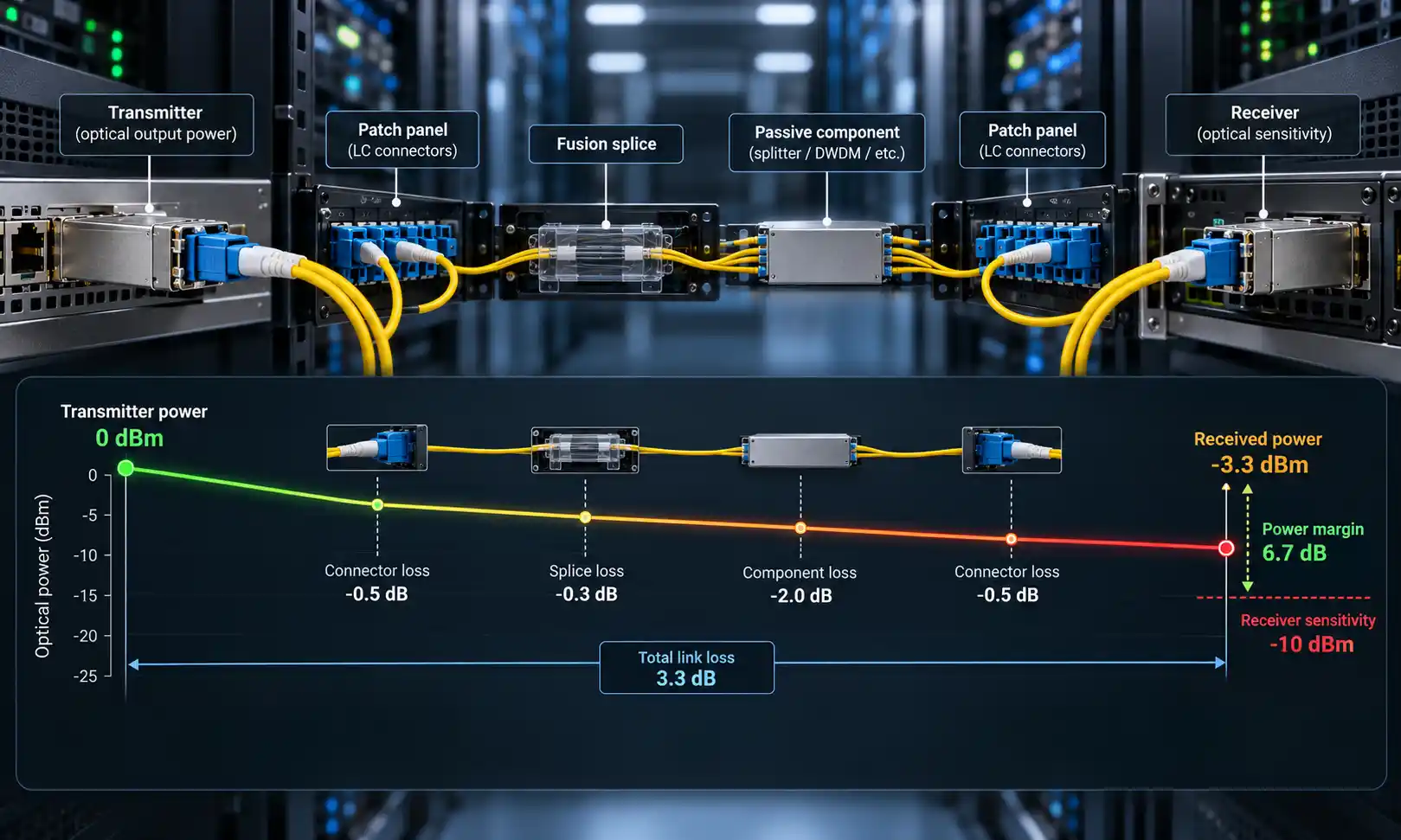
5. Calculate the Optical Power Budget
The distance label on an SFP module is only a starting point. A link works only when the received optical power stays within the receiver's allowed range.
Available power budget = minimum transmit power - receiver sensitivity
Estimated link loss = fiber attenuation + connector loss + splice loss + patch panel loss + mux/demux insertion loss + safety margin
The available budget should be higher than the estimated link loss. If the margin is too small, the link may work during initial testing but become unstable after connector contamination, bending, temperature changes or future patching changes.
Example: Checking a 10km LX Link
Assume a 1000BASE-LX module has a usable optical budget of 12 dB. A 10km single mode route is estimated at 3.5 dB fiber attenuation, 1.2 dB connector loss, 0.4 dB splice loss, 0.5 dB patch panel loss and 3 dB safety margin. The estimated link loss is 8.6 dB. In this case, the 12 dB module budget leaves about 3.4 dB of margin, so the link is reasonable if the receiver input power also stays below the overload limit.
6. Check Receiver Overload on Short Links
Long-reach optics can produce too much received power on short fiber routes. To check this, estimate the received power:
Expected received power = transmit power - actual route loss
If the expected received power is higher than the receiver's maximum input power, use a suitable attenuator or choose a shorter-reach module. This is especially important for ZX and EZX modules used on routes much shorter than their rated distance.
7. Confirm Device Compatibility
An SFP module can physically fit into a port but still fail compatibility checks. Before ordering, confirm the switch brand, exact model, port type, supported speed, firmware version, coding requirement and operating temperature range. For outdoor cabinets, transportation networks, energy systems or FTTA environments, also check whether industrial-temperature optics and protected cable assemblies are required. FOCC's FTTA solutions may be relevant for outdoor fiber deployments.
Common Selection Scenarios
Scenario 1: 300m Multimode Link in a Data Center
If the installed cable is OM3 or OM4 multimode fiber and the route stays within the supported short-reach range, 1000BASE-SX is usually the most direct choice. LX, EX or ZX would add unnecessary complexity.
Scenario 2: 8km OS2 Link Between Two Buildings
For an 8km OS2 single mode route with LC duplex patching, 1000BASE-LX is normally the first option. Check switch compatibility and link budget, but there is usually no need to jump directly to ZX.
Scenario 3: 35km Campus or Metro Route
If LX does not provide enough optical budget, compare LH and EX modules. The final selection should be based on datasheet values, not only on the product name.
Scenario 4: One Fiber Strand Available
If only one single mode fiber strand is available, use a matched 1000BASE-BX pair. Confirm the two ends have opposite transmit and receive wavelengths before installation.
Scenario 5: Long-Reach Module Used on a Short Route
If an 80km ZX module is used on a short lab or cabinet link, measure or estimate received power before connecting production equipment. A fixed attenuator may be needed to prevent overload.
Common Mistakes to Avoid
Choosing Only by Distance Rating
A longer rated distance is not always safer. The module must fit the actual route loss and receiver input limits.
Mixing SX with Single Mode Fiber
SX is designed for multimode fiber. If the route is OS2 single mode fiber, LX or another single mode SFP type is usually the correct direction.
Using LX over Multimode Fiber Without Checking MCP Requirements
LX over MMF is possible in some cases, but legacy MMF may require a mode conditioning patch cable. Check the cable grade and vendor recommendation before deployment.
Buying the Wrong BX Pair
Two identical BX modules usually cannot communicate. Always buy matched A/B or U/D pairs.
Ignoring Connector Cleaning and Polarity
Dirty end faces, wrong Tx/Rx polarity and incorrect patching can cause the same symptoms as a wrong module. Inspect and clean connectors before replacing optics.
Skipping Compatibility Testing
Third-party optics may require compatible coding for branded switches. Test one sample before volume deployment, especially for critical links.
FAQ
Q: Is an MTP connector the same as an MPO connector?
A: MTP is a high-performance MPO-style connector developed by US Conec. MPO is the generic multi-fiber push-on interface. MTP connectors are designed to comply with MPO connector standards and intermate with standards-compliant MPO-style connectors.
Q: What is the main advantage of an MTP connector?
A: The main advantage is high fiber density. One MTP connector can connect multiple fibers, which makes it useful for data center trunks, parallel optics, and modular patching systems.
Q: What is the difference between MTP-12 and MTP-16?
A: MTP-12 uses 12 fibers, while MTP-16 uses 16 fibers. MTP-12 is common in traditional structured cabling. MTP-16 is used when the transceiver or cabling architecture specifically requires 16 fibers. The correct choice depends on the optical lane design and migration plan.
Q: Can I plug an MTP connector directly into a QSFP transceiver?
A: Only if the QSFP transceiver uses an MTP/MPO interface and the cable gender, polarity, fiber count, fiber type, and loss budget match the module requirement. Some QSFP and QSFP28 transceivers use MTP/MPO, while others use duplex LC.
Q: What causes high insertion loss in MTP connections?
A: Common causes include dirty end faces, poor ferrule alignment, damaged guide pins, incorrect mating, too many mated pairs, poor polishing quality, and using components that do not meet the required loss grade.
Q: Is low-loss MTP always necessary?
A: No. Low-loss MTP is most useful when the channel has multiple mated pairs, a tight optical power budget, or high-speed transmission requirements. If the link has enough margin, standard-loss components may be acceptable.
Q: How should MTP connectors be cleaned?
A: Inspect the connector first. If contamination is present, clean it with an MTP/MPO-compatible cleaning tool, inspect again, and then connect. Do not touch the end face or clean it with ordinary tissue or cloth.
Conclusion
1000BASE-SX, LX, LH, EX, ZX, EZX and BX modules all support Gigabit Ethernet fiber transmission, but they solve different link problems. SX is for short multimode links. LX is the standard starting point for many 10km single mode links. LH and EX are used when more reach is needed. ZX and EZX are for long or ultra-long single mode routes. BX is different because it saves fiber by transmitting and receiving over one strand.
The safest selection method is to start with the installed fiber type and actual route distance, then check wavelength, connector format, optical budget, receiver overload, compatibility and operating environment. For long-reach, BiDi, CWDM or DWDM links, datasheet verification is more important than the product name alone.