Welcome to buy the odva lc/upc outdoor fiber optic waterproof connector with our factory. As one of the leading manufacturers and suppliers in China, we also welcome the customized orders. Consult the price and the quotation with us now.
Designed around the way outdoor fiber connections are serviced
Outdoor connections are often opened during commissioning, troubleshooting or cable replacement. The connector therefore needs to do more than provide an optical interface. It also needs a stable panel mount, enough room for the mating assembly and a practical way to protect an unused port.
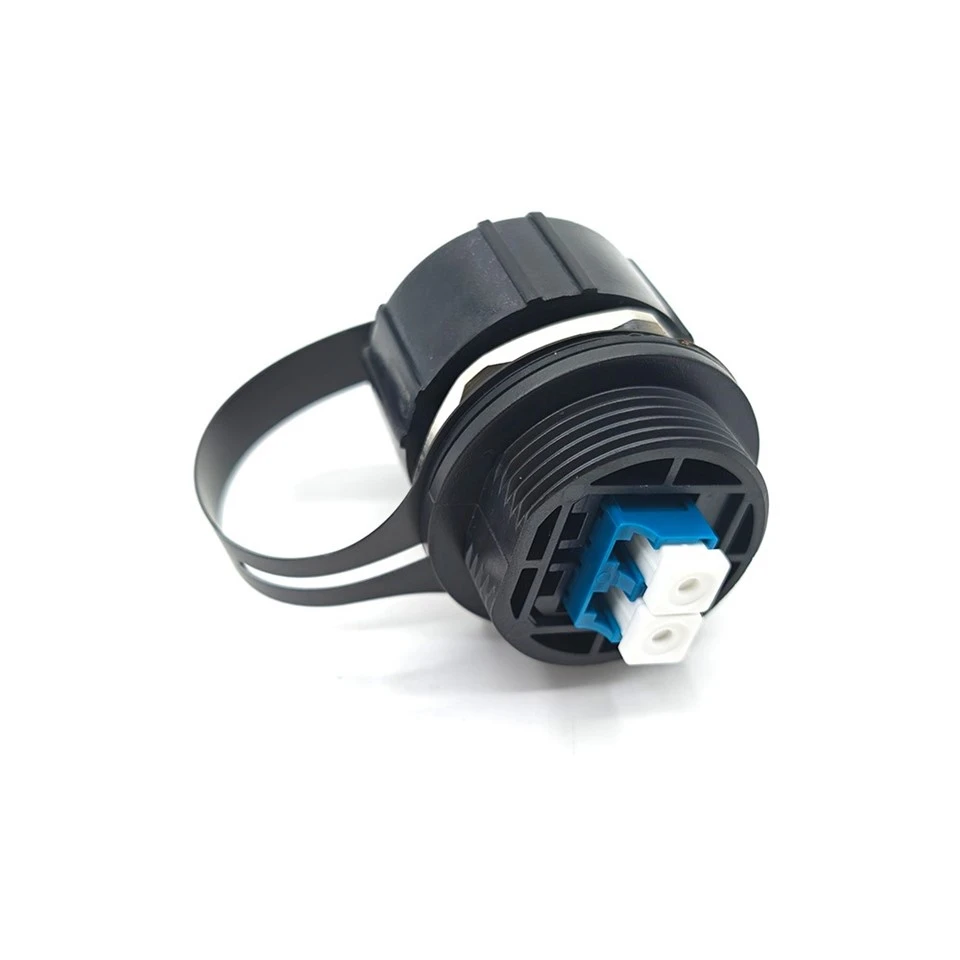
Captive cap for disconnected or spare ports
The protective cap is attached to the connector with a flexible tether. When the port is opened, the cap remains beside the connector instead of becoming a loose part on the enclosure or tower. Close the cap whenever the interface is unused or temporarily disconnected. Cleanliness of the LC end face still needs to be checked before reconnection.
Threaded body and hex locknut for panel mounting
The threaded body passes through the equipment panel and is secured with a hex locknut. This gives the enclosure designer a defined external connection point while leaving the internal fiber routing inside the box. Confirm the hole diameter, panel thickness, sealing washer position and tool clearance from the approved drawing.
LC/UPC duplex reference build for two-fiber links
This page uses a duplex LC/UPC, two-fiber, single-mode configuration as the reference build. Confirm the actual simplex or duplex configuration, port keying, polarity and fiber type when ordering. LC/UPC and LC/APC are different interface finishes and should not be treated as interchangeable at the same connection point.
Grip-friendly outer profile
The ribbed black cap and outer body provide a practical gripping surface for field handling. When several connectors are installed on one panel, allow room for the cap to move and for the mating connector to be inserted, locked and removed without contacting adjacent ports.
Installation sequence
- Check the panel. Verify the approved cutout, panel thickness, connector projection and internal routing space before drilling or punching the enclosure.
- Mount the connector body. Position the sealing elements as specified, pass the body through the panel and tighten the locknut using the approved installation procedure and torque.
- Inspect and connect the fiber. Check the LC/UPC interface and fiber end face, clean them according to the site procedure, then connect the fiber. For duplex links, verify the two-fiber polarity.
- Complete the external mating connection. Use the matching outdoor cable assembly or plug. Check the locking features, cable seal and strain-relief arrangement.
- Protect and inspect. Close the captive cap on an unused port and check the mounting, cable bend radius, port identification and required optical test results.
Where it fits in an outdoor fiber system
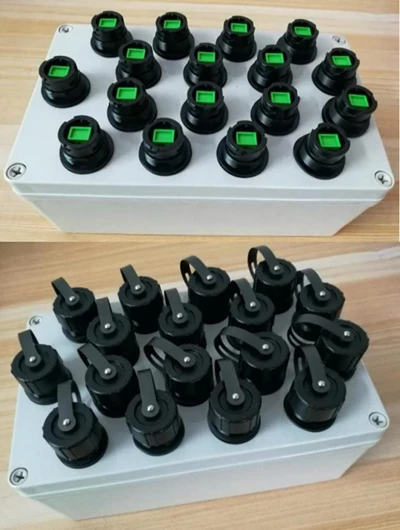
Outdoor fiber enclosures and terminal boxes
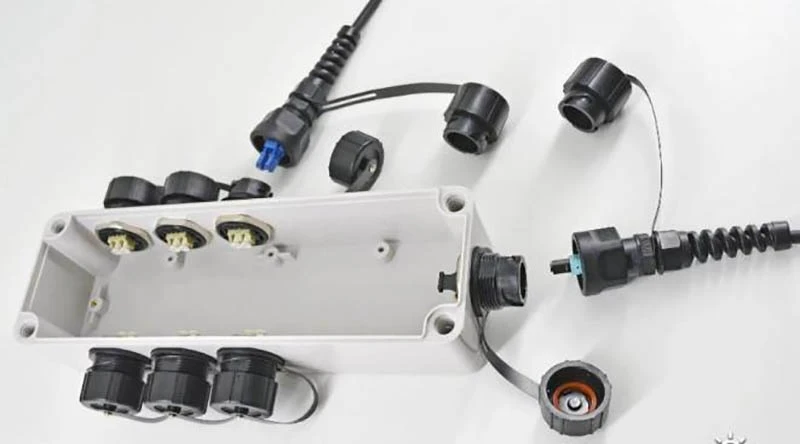
Use the connector as an external fiber entry point on a box or terminal enclosure. The external cable can be connected at the panel while splicing, routing and fiber management remain inside the enclosure. This arrangement is useful where an installation needs service access or spare ports for later expansion.
Telecom towers and outdoor distribution units
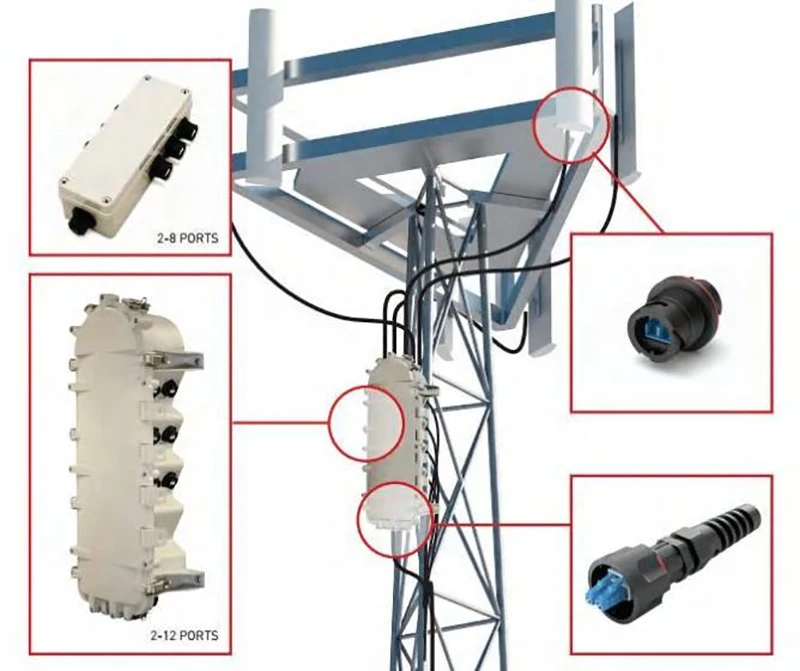
The application material shows the connector family used with tower-mounted and outdoor distribution equipment. Confirm the cable assembly, strain relief, service clearance and environmental requirement for the actual project. For FTTA or other equipment interfaces, verify the equipment-side connector and fiber configuration separately.
Multi-port equipment panels
Several connectors can be arranged on one panel when the equipment requires a concentrated set of external fiber ports. Leave room for port labels, cap movement and connector handling. The application images show a product family installation concept; they should not be read as proof that every pictured interface is the LC/UPC model.
Reference specifications
| Item | Reference configuration | Ordering note |
|---|---|---|
| Product | ODVA-LC-UPC outdoor fiber optic connector | Confirm the exact model and mating assembly. |
| Fiber interface | LC/UPC | Interface marking is shown in the product image. |
| Interface configuration | Duplex, 2-fiber | Confirm simplex/duplex and keying. |
| Fiber type | Single-mode OS2, 9/125 µm | Must match the cable and equipment link. |
| Protection target | IP67 | Reference target; confirm the full assembled test condition. |
| Insertion loss | ≤0.30 dB reference target | Confirm whether the limit is typical or maximum, plus test wavelength and method. |
| Return loss | ≥50 dB reference target | Reference for the single-mode UPC configuration; verify by test report. |
| Operating temperature | -40°C to +85°C reference range | Confirm the rating of the housing, seal and interface components. |
| Mounting | Panel or enclosure mount | Threaded body with locknut; check the approved drawing. |
| Thread example | M25 × 1.5 | Layout placeholder only; do not use for machining without confirmation. |
| Panel cutout example | Ø25.5 mm | Applies only to the example thread arrangement above. |
| Panel thickness example | 1–3 mm | Confirm against the locknut and sealing design. |
| Protective cap | Captive external cap | Visible in the product images. |
| Housing | Black outer body with metal hex locknut | Material, UV resistance and flammability rating require confirmation. |
| Overall dimensions | To be completed from the approved drawing | Include cap, projection and tool-clearance requirements. |
| Supply scope | Connector body, plug, cable and seals as specified | Do not assume all accessories are included; state them on the quotation. |
IP67 generally refers to dust protection and temporary immersion under defined test conditions. It does not mean unlimited water depth or permanent submersion. The final rating depends on the connector, mating plug, cable seal and enclosure installation as a complete assembly.
What to check before accepting a shipment
Start with the parts that affect field handling: the housing, cap, tether, threads and hex locknut. Check for visible damage, damaged threads, loose hardware and a cap that cannot be opened or closed as intended.
Then verify the LC/UPC configuration, interface cleanliness and mating condition. For a duplex build, confirm the two-fiber position and polarity. If optical acceptance is required, agree on the test wavelength, method and acceptance limit in the purchase specification.
For outdoor use, ask which assembled condition was used for the protection test and whether the test included the mating plug, cable seal and panel interface. A project quality record may include appearance, dimensions, optical performance and environmental test evidence.
Send these details with your RFQ
- Required quantity and target delivery date.
- LC/UPC interface configuration, fiber type and duplex polarity requirement.
- Panel cutout, panel thickness and the current enclosure drawing.
- Mating cable or plug model, photo or dimensional drawing.
- Installation environment, required protection level and temperature range.
- Whether you need the connector body only, a mating plug, a pigtail or a complete cable assembly.
- Sample, port marking, packaging and test-document requirements.
For a custom interface, cable length or panel arrangement, confirm the available model and mechanical drawing before finalizing the purchase order.
Frequently asked questions
Can I use a standard LC/UPC patch cord?
The optical interface may be compatible, but a standard indoor patch cord does not automatically provide the locking and sealing features required by an outdoor connection. Confirm the complete mating cable assembly before ordering.
Are all ODVA-LC products interchangeable?
No. Products with similar names can differ in body size, thread, keying, interface position and sealing parts. Confirm the drawing or a sample rather than selecting by the product name alone. The product name on this page is not a cross-brand compatibility or certification claim.
Does the captive cap by itself make the assembly IP67?
This page uses a duplex LC/UPC, two-fiber, single-mode reference configuration. The actual order should state the interface count, adapter arrangement and cable assembly explicitly
Are there any fees for submitting my business to a directory we
No. The protection rating depends on the cap, connector body, seals, mating plug and panel installation as a complete assembly. IP67 on this page is a reference target pending model-specific test confirmation.
Installation reference
Hot Tags: odva lc/upc outdoor fiber optic waterproof connector, China, factory, suppliers, manufacturers, quotation, customized, price, buy